Releases

2022.12.17

Download Show checksums

SAML Single Sign-On Support

We have added support for single sign-on using SAML2. See the documentation for instructions on enabling it and connecting Reporter to your SAML provider.

New API Routes

  • Tasks can now be created, edited, assigned to users, and completed
  • Task sets can now be created, edited, and added to assessments.
  • You can now create findings from finding templates through the API

The python API wrapper has been updated with the new routes. Check the API documentation for details.

Results Table Options

New options are available for results table component:

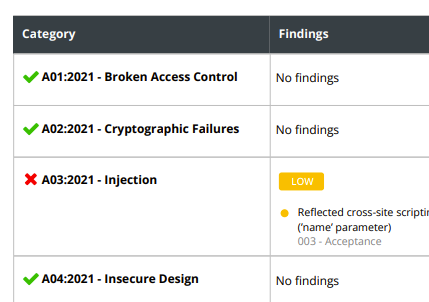
  • The green checkmark or red X that indicates if vulnerabilities are present in a category can now be disabled.
  • Choose which risk severity flips a category from a green checkmark to a red X.

Reporter results table component

Moreover, you can now select options for the results table in the Findings tab of an assessment. Assessment-level settings are used as the default for any settings not explicitly set in the component. You can set a default for new assessments from Settings > General > Assessment Defaults.

Other Changes

  • Uploaded images are now optimized.
  • Updated tool output file parsers.
  • The upload bar has been improved so that it no longer looks like an upload is finished when it is still processing.
  • Added a webhook that fires when a new update for Reporter is available.
  • Missing or inaccessible images in markdown fields now show an 'image not found' placeholder image.
  • Optimized PDF report creation process.

Bugfixes

  • Fixed an issue where 'edit severity' was always unchecked when editing a draft retest.
  • Fixed broken image border color setting.
  • Fixed an issue where the short ID field was too short to fit a short ID.
  • Fixed an issue where the automatically suggested short ID would sometimes be too long.
  • Fixed a rare exception when trying to download PDF reports.
  • Fixed an issue where assessments were sometimes incorrectly sorted when deadlines were set using the API.
  • Fixed a bug where completed assessments weren't sorted properly.
  • Fixed an issue where documents for new findings, targets, and finding templates weren't read properly after a validation error.
Read more

2022.11.30

Download Show checksums

Assessment Templates - Requires Attention

API breaking change! To improve clarity, 'Assessment Types' have been renamed to 'Assessment Templates'. Due to this, there are some breaking changes in the API:

  • The assessment_type_id and assessment_type_name fields on assessments have been renamed respectively to assessment_template_id and assessment_template_name. Requests to retrieve assessment types (now templates) and to create assessments will need to be updated. Requests to update assessments may also need to be updated if they modify either of the renamed fields.
  • Finding Templates now have a severity_metrics_all field that contains different metrics for each scoring system. See the updated API documentation for details, and note that finding templates may only have metrics for a subset of the scoring systems.

Client Leads

Admins can now assign client users as client leads within an assessment, similar to how they can assign researchers as managers.
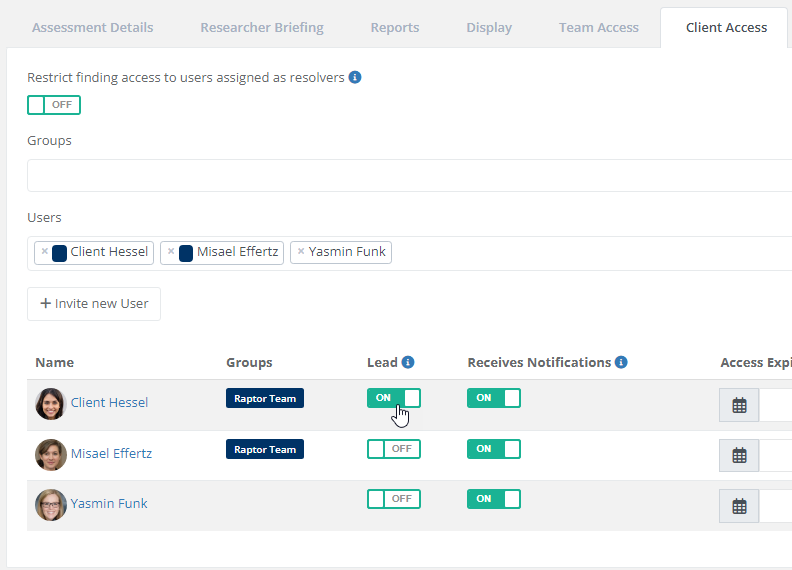
reporter client leads assign

Client leads are displayed more prominently on the assessment page and serve as primary contact for other client users. Besides this, leads can have additional privileges that can be configured via the main menu under Settings > General > Functionality. You can configure which client users can access the following functionality:

  • Managing other client users.
  • Requesting assessment deletion.

Note! For existing Reporter installations, these functionalities will be available for all client users after updating. We recommend limiting these functionalities to client leads only. Please note that by doing so, you are required to assign client leads for existing assessments to make these functionalities available.
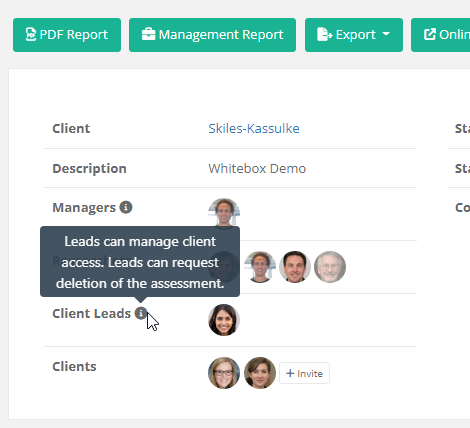
Reporter client leads view

New Assessment Templates

Reporter ships with several built-in assessment templates you can use as a basis for your templates and reports.

We have added the following new default templates:

These new templates, and fresh copies of the existing templates, can now be imported from the Assessment Template page. They are not automatically added to existing installations. More templates will be added in future releases.

CSV Export

Exporting an assessment's findings to a CSV file from the assessment overview page is now possible.
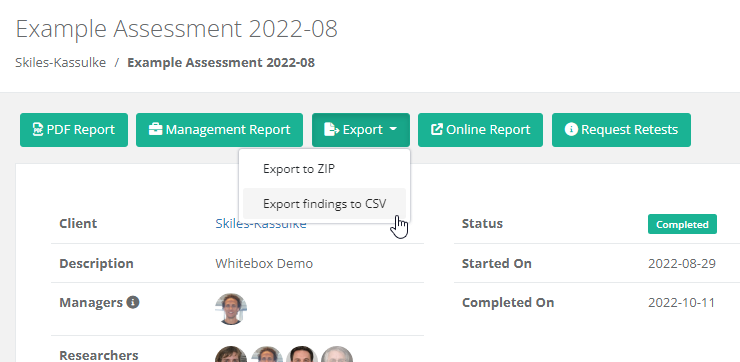
CSV Export

Other Changes

  • Finding templates can now be set up using multiple scoring systems. Reporter uses the score from the appropriate scoring system when you use a template to create a finding.
  • When you create an API token, you can now set a date/time for it to expire.
  • The 'Findings Table' report component can now be sorted by severity, name, or one of several more options. If you want to use this feature, we recommend re-adding the component to your assessment templates and selecting the desired sorting option.
  • Improved the way suggested changes to finding templates are compared to the original when evaluating the change.
  • Improved the comparison between a finding and similar findings and finding templates when suggesting a finding as a new template or evaluating the suggestion.
  • Third-party finding templates have been updated.
  • Added the ability to import default assessment templates. Default templates were previously only seeded into new environments.
  • To improve consistency with other scoring systems, saving a finding with CVSS score 0 will no longer set its severity to OK but to Info.
  • The API wrapper (https://pypi.org/project/securityreporter/) has been updated to work with the latest API changes.

Bugfixes

  • Fixed an issue where the front page was sometimes missing in PDF reports.
  • When a user is blocked, they are no longer removed as researchers or reviewers from assessment phases, or from the front page of assessments.
  • Fixed a bug where required markdown fields would block a form from being submitted without displaying any errors.
  • Fixed an error where validation errors weren't always shown for markdown fields.
  • Fixed a bug where automatically scrolling to the first error in a form would sometimes scroll too far.
  • Fixed a bug where the online report did not show the content middle background image.
  • Fixed a bug where non-vulnerable severities were not copied with templates.
Read more

2022.10.14

Download Show checksums

Requires Attention

Breaking change! Environment variables related to the SMS configuration have been renamed. To prevent breaking functionality related to SMS (such as 2FA), the variables listed below should be renamed. See the documentation for more information.

Old New
NEXMO_ENABLED VONAGE_ENABLED
NEXMO_KEY VONAGE_KEY
NEXMO_SECRET VONAGE_SECRET
NEXMO_FROM VONAGE_SMS_FROM

Python API wrapper

We've released an API wrapper to simplify the interaction with the Reporter API:

Multiple report themes

Major improvements have been added to the Report theming. You can now create multiple report themes that can be assigned to individual assessments or assessment types. Besides this, many other improvements are included, such as the exporting and importing of themes, the ability to upload or swap entire font families, and to change the font of code blocks.

Improved search 

Another major addition in this release is the improvement of the search functionality, including many new filters and a toggle for the 'AND'-search.

Other new and improved features

  • Mobile phone numbers are now validated and stored according to international standards.
  • Added examples for classifications in finding and finding template API docs.
  • Added an option to the results table component to show the complete short ID for each finding.
  • Invite client users by selecting a group on the assessments show page.
  • Option to hide table of contents in reports.
  • Allow SVG images for client logos.
  • Add a button in user profiles that links to the user's activities.
  • Make the assessment type name editable.

Bugfixes

  • Fixed an issue where fonts with certain special characters in the file name (such as underscores) broke the PDF report.
  • Fixed an issue where captions for syntax-highlighted code blocks were missing in the PDF report.
  • Fixed an issue where captions of code blocks used the wrong font in the HTML report.
  • Similar to the HTML report, inline images are rendered inline in the PDF reports.
  • Header sizes in the PDF and HTML reports are now consistent. 
  • Focus markdown area when clicking the input label.
Read more

2022.08.04

Download Show checksums

Task Improvements

  • Directly create new tasks from the researcher panel.
  • Assign weights to custom tasks and tasks in task sets. Tasks with higher weights are displayed first in the overview.
  • The deadline options for tasks have been clarified.
  • Custom tasks are no longer required to have a deadline. Tasks without a deadline are never hidden.
  • The visibility of the number of tasks has been improved in the researcher panel.
  • More task activities are now being logged.
  • Tasks created by using task sets now have a label with the name of the task set.
  • The user who has completed a task is now displayed.

Bugfixes

  • Fixed an issue where generating a preview report would fail when using the 'Researchers' component on the front page without (academic) titles.
  • Fixed a bug where the 'Relevant for assessment status'-filter also filtered out completed tasks.
  • Fixed an issue where tasks with no deadline were listed before tasks with a deadline.
Read more

2022.07.21

Download Show checksums

Bugfixes

  • Fixed a bug where report generation would break when rendering images without a caption.
  • Fixed an issue where the 'new page after findings'-toggle in the settings was always off.
  • Fixed incorrect styling for some green buttons.
  • Fixed an exception related to setting non-custom assessment short IDs through the API.

Improvements

  • The 'Preview report' functionality that is available under the 'Report Customization' now generates the report in the background.
Read more