Releases

2023.04.21

Download Show checksums

Assessment comments

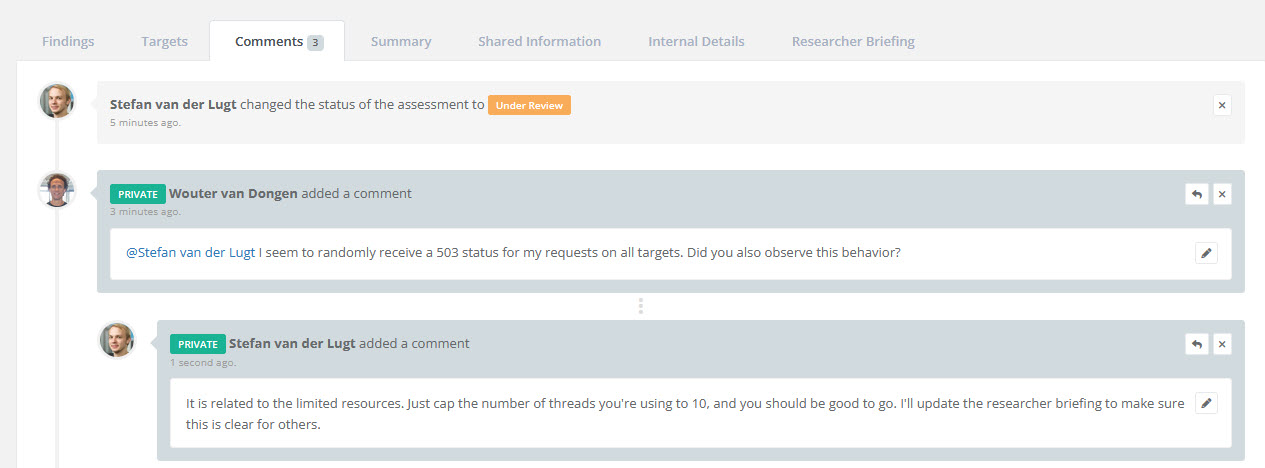
Similar to the existing commenting functionality for findings, you can now post comments regarding the entire assessment to enhance collaboration and communication. Furthermore, comments include events that display assessment status changes and the responsible individual, providing valuable context.

Reporter assessment comments

Assessment commenting key features:

  • Private comments for researchers
  • Replies to threads
  • Tasks to reply to client comments
  • User tagging with immediate notifications
  • Other comments are added to the "this is what you missed on..." mail.

Online Report inline edit

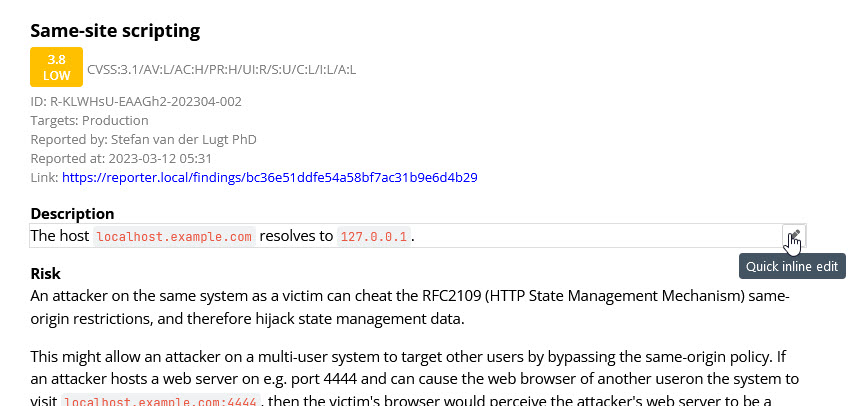
You can now edit findings, sections, and retests directly inside the online report, making it easier than ever to update content quickly.

Security Reporter Full report inline edit

  • The default Researcher and Reviewer roles can now access the online report. For custom roles, we recommend granting access to improve their experience.
  • Enjoy a more responsive online report with reduced loading times, thanks to the implementation of caching.
  • These changes introduce minor differences between the online and PDF reports, but only for users with report editing permissions. Client views are unaffected.
    • Empty sections now have more spacing to accommodate the edit button.
    • Finding fields, such as Risk, are now displayed even when empty.

Schedule assessments without an end date

  • You can now schedule assessments with only a research start date.
  • Assessments with only a research start date will appear in the schedule on that specified date.
  • This feature is recommended for scheduling recurring (periodic) assessments well in advance.

Refined assessment deletion options

We have reworked the assessment deletion to provide more clarity and control. There are now two types of deletion:

  • Soft Deletion: Removes all findings, retests, sections, and sensitive data while retaining metadata such as internal details, research hours, and scheduled dates.
  • Hard Deletion: Completely deletes the assessment, excluding the activity log, which retains basic information (e.g., a user created a finding in a deleted assessment).

To enhance usability, we have made the following changes:

  • Soft-deleted assessments are now visible in the assessment index for admins only, sorted last.
  • Only soft-deleted assessments can be hard-deleted.
  • Admins can hard-delete soft-deleted assessments via the assessment dropdown.
  • Admins can soft-delete assessments without a client user request from the assessment dropdown (available on the larger assessment page dropdown).
  • A new filter for deleted assessments has been added to the assessment index.
  • Activity for hard-deleted assessments remains and is labeled with "deleted assessment."

API 

  • Activity Retrieval: Activities can now be fetched as includes of assessments and findings for easier access.
  • Activity Field Change: The data.finding_title field has been removed from activities. To obtain that information, retrieve the finding as an include. Titles of deleted findings are no longer accessible.
  • Webhooks Creation: You can now create webhooks directly through the API for increased flexibility and integration.

Other improvements

  • You can now find assessments by searching for the client's name.
  • Assessment-related emails now include the client's name for better context and identification.
  • The "current" version in the version comparison bar now displays additional information, such as author, date, and (review) status for improved clarity.

Bug Fixes

  • CSV Export: Resolved an issue causing CSV exports of 'Severity Only'-assessments to fail.
  • Review Buttons: Fixed the missing review buttons in the researcher panel.
  • Retest Events: Corrected the placement of "... rejected a retest" events in the finding timeline.
  • Online Report Styles: Addressed multiple issues where incorrect styles were applied to elements of the online report.
  • Report Themes: Fixed the inability to delete report themes.
  • Finding Edit Form: Resolved an issue preventing the submission of the finding edit form while a retest was pending.
  • Findings Table Width: Adjusted the findings table component to match the width of other tables in the PDF report.
  • API Documentation: Fixed the display of parameters, now correctly showing them as arrays of strings instead of arrays of objects.
Read more

2023.03.02

Download Show checksums

Report component options

We have added two new options to the report components:

  • You can now hide the short (numeric) IDs in the results table component
  • You can now hide the short (numeric) ID column in the findings table component

To use these options, you will need to re-add the components.

The results table displayed on the 'Findings tab' of an assessment can be configured via 'Edit Assessment > Display (tab)', and defaults can be set in 'Settings > General > Assessment Defaults (tab)'.

Improvements

  • The compilation speed of PDF reports for assessments containing many code blocks has been greatly improved.
  • We have implemented a new feature that logs authentication attempts as activity. This includes information such as the authentication method, 2FA attempts, and IP address. You can view these activities on the activities page or retrieve them using the API.
  • Logged activities can now be filtered by one or more 'activity categories'. This filter is also available via the API (see API docs).
  • Tagged assessment sections displayed in the portal now link to the online report (if available).
  • Placeholder, badge, and icon report components are now available in more places, such as in findings and comments.
  • We've added a new 'Smart' option to the 'Start sections on new page' setting in Report Themes. With this option, a page break will be added after any non-empty assessment section. The existing 'Smart' option has been renamed to 'Smart (up to H2)', bringing it in line with the documentation and clarifying that it only affects the first two heading levels.
  • New settings have been added to the 'Report Themes':
    • Render PDF images as links: whether images included in markdown fields should be rendered as clickable links in the PDF report. These links allow the reader to view images in full-size via the browser for more details. We recommend disabling this option if you create PDF reports for clients that do not have access to the assessment in Reporter.
    • New page before findings: whether to insert a page break between a section's description and the first finding in the section.
  • The CWE and CAPEC classifications have been updated to their latest versions. To ensure you are always working with the most current version, each new Reporter release will contain the latest available version of these classification systems.
  • Assessments on the dashboard can now be filtered:
    • All: display all assessments you have access to.
    • Member (admin only): display all assessments where you are a team member.
    • Assigned: display assessments where you are assigned to the current assessment phase. 
  • To ensure consistency between the online and PDF reports, we have increased the margins above and below markdown lists in PDF reports.

Bug Fixes

  • Fixed an issue where adding multiple components or caution tags on the same line would cause some text or components to be rendered multiple times.
  • Fixed an issue where mark tags within mark tags would cause text to be rendered multiple times.
  • Fixed an issue where admins received 'Retest Performed' notifications.
  • Fixed a crash when exporting findings as CSV for assessments with the 'Severity Only' scoring system.
  • Fixed an issue where in-app notifications did not specify that you were tagged in comments, retests, etc.
  • Fixed a bug where the 'badge highest risk'-component did not render inline.
  • Fixed a bug where adding a newline after the 'badge highest risk'-component caused report compilation to fail.
  • Fixed a crash when opening a finding as an admin in assessments where findings are restricted to resolvers.
  • Fixed a bug where the 'scope' component in assessments without targets would cause report compilation to fail.
  • Fixed a bug that prevented the deletion of client logos, avatars, and theme documents.
Read more

2023.01.31

Download Show checksums

Add the client's logo to the report

You can now add the client's company logo to the report using text box items. You can set a maximum height and width, and the logo will automatically scale to fit.

Convert comments to retest requests

You can now convert a finding comment from a client into a retest request if a client accidentally submits a comment that was intended to be a request for a retest.

Improvements

  • The loading of the researcher panel has been optimized.
  • The form to request the deletion of an assessment has been improved to emphasize the fact that data will be permanently deleted.
  • Closing a real-time notification is now instantly synced with other open Reporter tabs.
  • If the description, risk, recommendation, or proof field of a finding is empty, the name of that field no longer appears in the PDF report, making it consistent with the online report.

Bugfixes

  • Fixed some issues that could cause the PDF report compilation to fail.
  • Fixed an issue where the review events of a retest did not appear as children of the retest.
  • Fixed a bug where severity badges in retests did not display correctly in online reports.
  • Fixed an issue where pasting binary payloads as text blocks would crash the PDF report compilation. We recommend attaching binary payloads as an attachment. In a future release, we will guide researchers to do so by optimizing the UI.
Read more

2023.01.17

Download Show checksums

Features

  • The researcher panel's state (filter and expanded/collapsed sections) is instantly synced between tabs.

Bug Fixes

  • The 'Hide finding metadata' and 'Hide finding links' options did not work in the HTML report.
  • Report compilation would fail if multiple (document) component tags were added in the markdown without spaces.
  • Long titles in findings sometimes overlapped with buttons on the finding show page.
  • The Report Text Boxes index listed unselectable themes.
  • The 'download PDF report'-buttons sometimes displayed incorrect timestamps.
  • The management report button was sometimes clickable when the management report was not accessible, resulting in a 'Forbidden' response.
  • Fixed several bugs that were not visible to users.
Read more

2022.12.31

Download Show checksums

Note this update may take a little longer to complete than usual. Grab a ☕, and enjoy this last update of 2022 🍾

Timezones

Users can now configure their timezone. The user's timezone will be automatically set when the user first logs in after this update and can be changed from the user's profile. Users will see timestamps according to their local time, except in generated files such as PDF reports. Generated files use the application's timezone.

The application timezone can be configured via the Settings > General > Functionality page.

Reports

Any timestamps on reports, such as those in finding metadata and the generated_at placeholder you may have on the front page, are reported in the application's timezone. If you want to display the current timezone on the report, there are two options:

  • If you have a generated_at timestamp on the front page of the report, we recommend adding the timezone to the format string. Either T for timezone or O for the difference to GMT. See https://www.php.net/manual/en/datetime.format.php under timezones for more options. See Settings > Report Text Boxes. For example, you can change the default [[GENERATED_AT|Y-m-d H:i:s]] to [[GENERATED_AT|Y-m-d H:i:s T]] to add your timezone at the end.
  • Alternatively, you can use a placeholder component in an assessment section to add the timezone elsewhere in the report. Either by name (e.g., CET) or by difference to GMT (e.g., +0100). Use the + button when editing a section, select Placeholder and choose one of the timezone options.

API Changes

  • All timestamps returned by the API are now in an ISO8601-compatible format, e.g., 2022-12-18T16:47:56.000000Z.
  • Any timestamps posted to the API now expect an ISO8601-compatible format (currently only found_at).

Improvements

  • More context about each finding is now displayed when importing findings from previous assessments, including the finding's status, severity, and the original assessment section.
  • The severity legend is now also shown in the findings tab on the assessment page.
Read more