Releases

2021.10.05

Download Show checksums

Assessment Schedule

Several new dates have been added for the assessment phases. Each phase now has a 'Research Start Date' and a 'Research Deadline', a 'Review Start Date' and a 'Review Deadline', and a 'Delivery Date'.

A schedule/agenda view has been added for assessment phases, accessible via the main menu. Each phase is separated into Research, Research Overtime, Review, and Finalization steps. The schedule can be filtered by assessment and user.
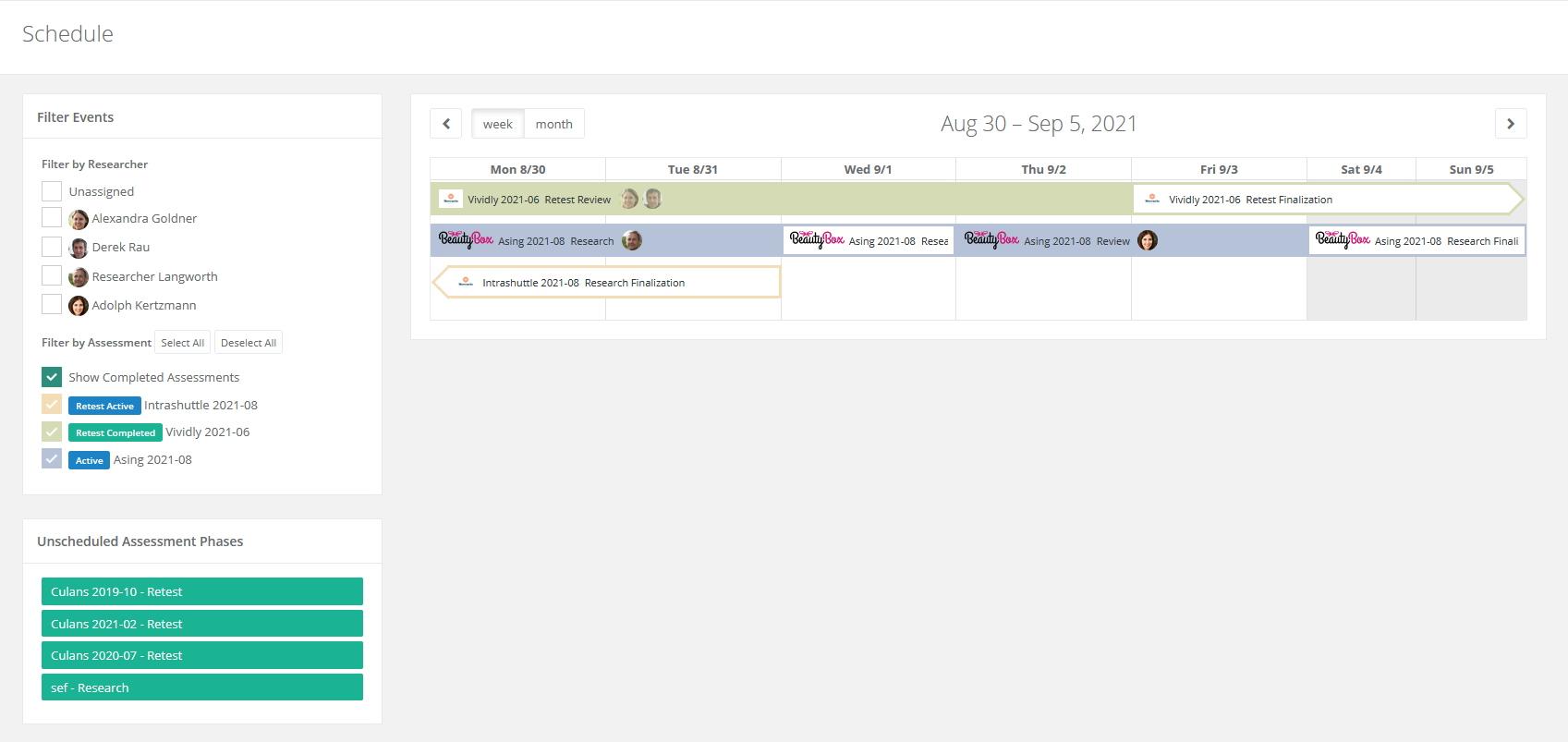
Security Reporter Schedule

The dashboard assessments table now shows users based on the assessment's status. It shows the researchers assigned to the latest phase if for 'Active' assessments, reviewers for 'Under Review', and any assessment managers for other statuses. This should give a much better overview of who is supposed to be working on which assessment right now. In addition, clients now always see the managers of an assessment in a contacts column.

Task Deadlines

Tasks now have deadlines. Most task deadlines are based on the deadline set in the current assessment phase. For example, a task to review a finding will use the 'Review Deadline' as a deadline.

  • Deadlines for custom tasks can be set when creating or editing them.
  • Deadlines for tasks from task sets can be preset in the task set before or in the individual tasks afterward.
  • Deadlines for tasks that don't relate to assessment phases, such as global tasks or comment tasks, can be set in business days from the Settings > Settings > Functionality page.

Tasks are only shown in the various overviews if they are relevant based on the assessment's status. For example, a task to add a finding to a section that requires findings is not shown until the assessment status is set to  'Active'.

A task overview has been added to the dashboard. For researchers, this shows how many tasks they have in each assessment, and how many of them are due in the future, today or in the past. Admins also have a tab to show unassigned tasks, and one to show tasks that are due today or overdue.
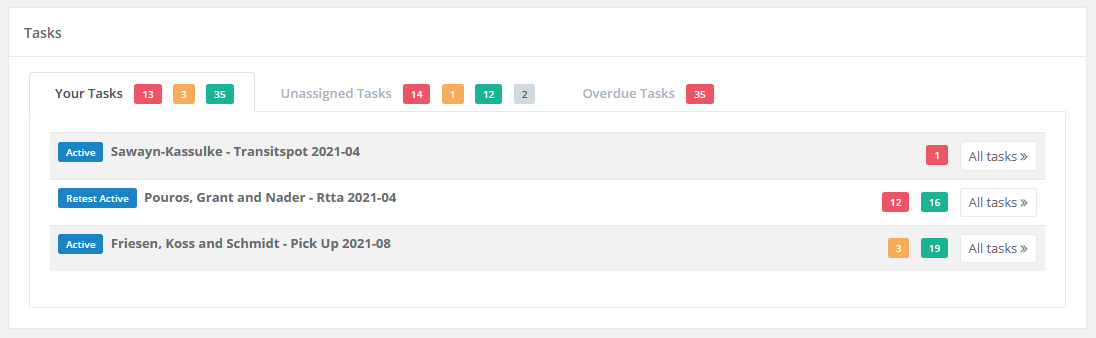
Security Reporter Dashboard Tasks

Other new and improved features

  • Scheduled assessments are now automatically set to 'Active' on the Research Start Date.
  • Added a 'Complete Assessment' button to the researcher panel if there are no caution tags, no drafts, and the assessment is has a 'Review Completed' status.
  • Assessment Phases are now completed when the assessment is. Only one uncompleted phase can exist.
  • Requesting a retest now also creates a retest phase if no uncompleted retest phase exists.
  • Impersonating a user now creates an activity.
  • Users of Internet Explorer now see a warning that their browser is not supported and can no longer log in.
  • Added search functionality and filters to clients.
  • Improved the links in some tasks to lead directly to the associated event or (prefilled) form.
  • Added (deactivated) after the names of blocked users in the application. This is not shown in reports, emails, or the API.


Bugfixes

  • Fixed a typo in the caption of the results table component.
  • Fixed a bug where no activity was created when deleting a finding.
  • Fixed several issues on the review page related to loading new pages in the tabs.
  • Fixed a bug where documents could not be retrieved via the API.
  • Fixed a bug where filtering activities in an assessment could show activities from other assessments.
  • Fixed an issue where date pickers would not close when clicking outside them.
  • Fixed an issue where finding templates weren't updated in Elasticsearch when their associated sections changed.
Read more

2021.09.13

Download Show checksums

Support for CWE and CAPEC Classifications

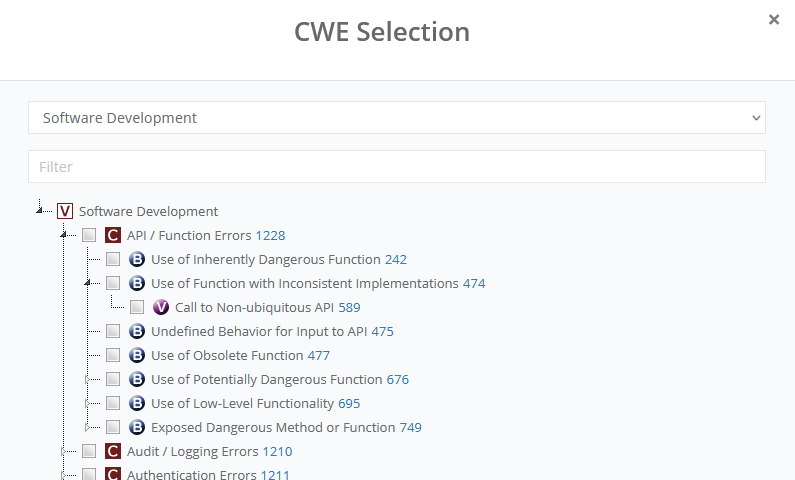
The classification of findings has been reworked. MITRE Common Weakness Enumeration (CWE), MITRE Common Attack Pattern Enumeration and Classification (CAPEC), and Bugcrowd Vulnerability Rating Taxonomy are currently supported. For MITRE based classifications, it is possible to examine the entries by using views.

Reporter CWE selection

The classification systems used can be set for each assessment, and the default classification systems for new assessments can be set from the settings page. Classifications have been added to finding templates where available.

Other new and improved features

  • Researcher panel buttons have been reworked.
  • Sections that contain caution tags are displayed with an icon in the researcher panel.
  • The action-required tooltips in the researcher panel have been improved.
  • Docker image is now based on Debian Bullseye.
  • Snippets for OWASP and CVSS risk assessment sections are now seeded and included in the relevant sections of seeded assessment types and assessments.
  • Blocking/Deleting of users has been improved.

Bugfixes

  • Fixed a bug where the copy markdown button didn't work after editing a markdown field.
  • Fixed caution tags in retests check.
  • Added existence checks for broadcasting. Loading broadcast channels will no longer rarely crash if a model has been deleted or access has been revoked.
  • Copy tags are now removed from the PDF instead of being shown as "[copy][/copy]" in reports.
Read more

2021.08.09

Download Show checksums

Activity Functionality

New Activity functionality is now available via the main menu. An overview screen shows the activity per assessment in the last seven days. Besides this, it is possible to filter and search in all logged assessment activities. The activity pages have been polished, so it is easier to keep an overview.

Other new and improved features

  • Versioning for finding templates.
  • Via a new button in the researcher panel, a researcher can now easily change the assessment to "Under Review" when the active research stage has been completed.
  • Via a new button in the researcher panel, a reviewer can now easily change the assessment status to "Review Completed" when the review has been completed.
  • Docs are now available via docs.securityreporter.app.
  • PHP-FPM directives are now configurable via env vars.
  • The researcher tree will now show an icon when a caution tag is present.
  • Fix order of finding version fields to be consistent with the ordering everywhere else.
  • Improved notifications are presented to client users when viewing an assessment that has not been completed yet.
  • The Reporter Docker container has been improved. 
  • Added a CVSS risk assessment table (component).
  • Breadcrumbs have been shortened to increase readability.
  • In target import, importable targets are now shown with the assessment title and date.

Bugfixes

  • Fixed broken links in assessment result tables of the HTML report.
  • Deduplicate VulnDB templates.
  • Fix links to Reporter settings in new environments.
  • Fixed exception in email-address-changed email.
  • Fixed a forbidden redirect when editing an assessment section as a researcher.
Read more

2021.07.23

Download Show checksums

Breaking changes

The setting 2FA_ENFORCE is renamed to MFA_ENFORCE.

Activity improvements

Elaborate activity logging is available within the assessment and under the user view.

Retest request improvements

A new assessment status "Retest requested" has been added. Creating a retest inquiry in a completed assessment now sets the status to "Retest Requested". Assessments with this status are displayed on the dashboard so a manager can easily schedule them. 

Reporter retest requested

Other:

  • The ability to cancel a retest request for a finding has been added. The report is not updated when canceling a retest. Previously, the retest request had to be deleted whereby information is lost, or a researcher/manager had to answer the retest request whereby the report was updated.
  • Reviewers can no longer trigger "Review Completed" if draft findings are remaining in the assessment.
  • Under the main menu item "Findings" it is possible to click on the "Retest requested" badge to directly show the associated retest request.

Invite users to assessment improvements

  • The "invite user" functionality has been clarified by adding tabs to the modal that separates inviting new users from existing users.
  • Clarified adding new clients for an admin/manager. It is no longer required to select a role for the client.
  • Inviting existing users to an assessment no longer refreshes the page.

Other new and improved features

  • Users without job titles or not associated with clients, now have the title of "Researcher", "Administrator", "Client" or "Member" in that order based on roles.
  • It is possible to directly link to finding events (displayed under the finding) such as a comment or a retest by clicking on the event timestamp. In these displayed finding events, the avatar and name of users now also link to the user view, so it is, for example, easy to look up this user's activity.
  • Timezones are now shown in the status report. Also, checks if the timezone is valid.
  • Assessment section updated messages are no longer sent when nothing or only the order was updated.
  • Clients can no longer be deleted if they have assessments unless the assessments are soft-deleted.
  • CVSS metrics are clarified (temporal and environmental metrics).
  • Users that receive a notification of an assessment delete request now also get a new task assigned.

Bugfixes

  • Fixed opacity setting for watermarks in the online report.
  • Fixed a bug that caused SMS notifications not always to be sent.
  • Fixed a bug where rejecting a retest from the review page would not reload the tab.
  • Fixed a bug where approving multiple findings or retests would create a string of buttons on the page.
  • Fixed a bug where creating a newly published retest would sometimes resolve it.
  • Fixed a bug where retests for a finding were sorted in a random order in the report.
  • Fixed a bug with the is-private toggle when editing comments.
  • Fixed an issue where resolved targets were not unset when unticking "partially resolve" when editing a retest.
  • Fixed two rare edge cases when changing the targets of a finding that has status changes or retests. Adding a target to the finding now also adds it to the resolved targets of resolved status changes and retests. Removing a target from the finding now resolves status changes and retests that resolve all of the finding's remaining targets.
  • Fixed an issue where the old severity determined the new status of a finding.


Read more

2021.06.28

Download Show checksums

Resolve findings partially

Findings with multiple targets can now be resolved for some of the targets, instead of all or none. The timeline and report will show which targets were resolved and when.

Reporter resolve finding some targets

Other new and improved features

  • The interface for adding report components has been improved.
  • The results table in the online report now has also has a legend risk indications table.
  • Pasting a link to Reporter now creates a relative link. These links keep working if the URL of Reporter changes.
  • Admins can now choose 'My Tasks' or 'All Tasks' when opening the task page.
  • The MySQL setting sql_require_primary_key that is enforced by some managed databases is now supported.
  • Findings marked as an 'Accepted Risk' can now also be imported from previous assessments.

Bugfixes

  • Fixed a bug where modified settings were not applied to reports.
  • Fixed an issue where lists could be wider than text in markdown fields.
  • Fixed an issue that made it impossible to edit the Researcher Briefing and Target Credentials from their respective tabs on an assessment page.
  • Fixed an issue where dragging-and-dropping sections would generate multiple alerts.
  • It is once again possible to assign finding templates to assessment sections through the assessment section edit page. This includes full search functionality (with synonyms) and template source icons.
Read more