Releases

2022.02.08

Download Show checksums

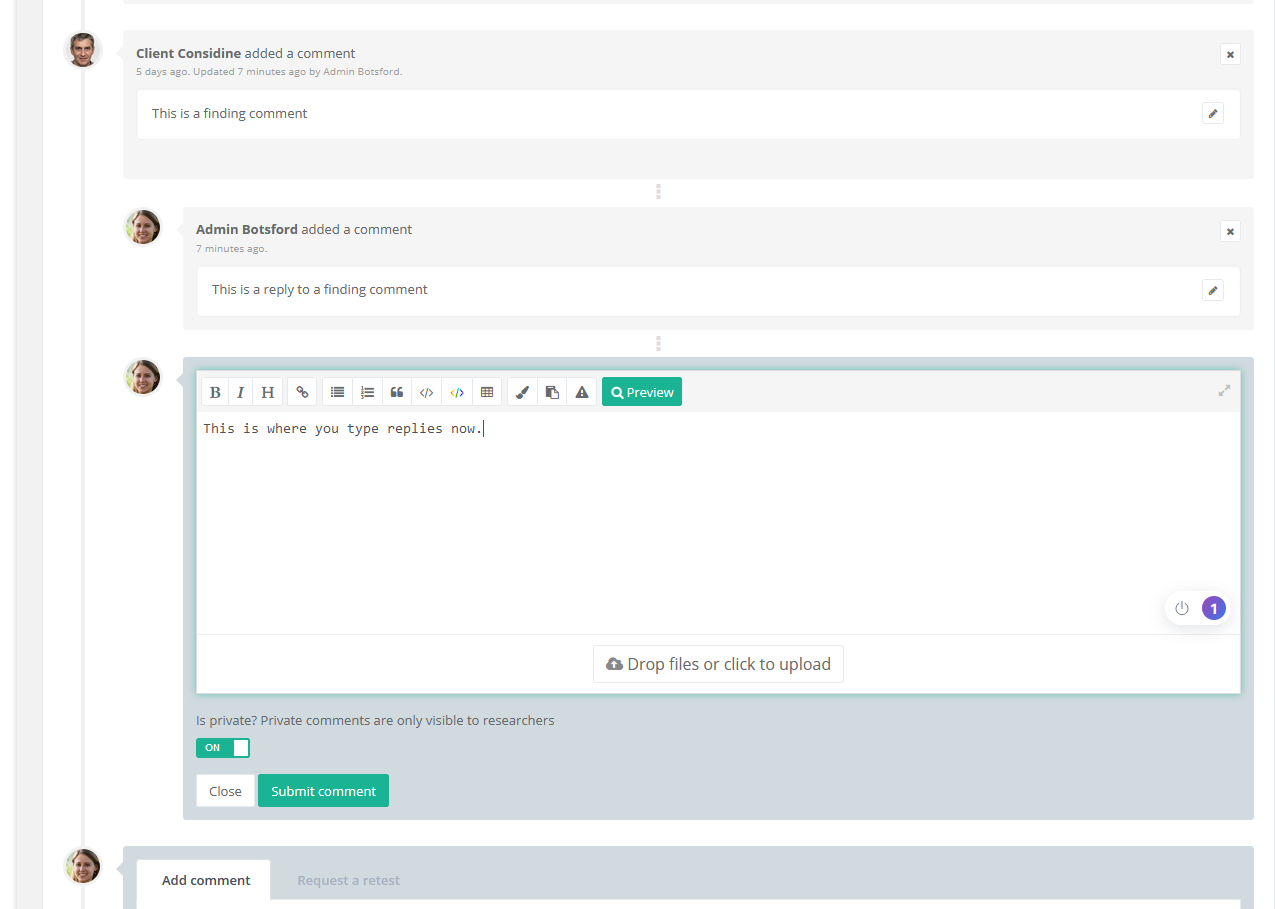
Comment improvements

  • Finding comments are now private by default.
  • You can now reply to top-level finding comments.
  • The comment reply form now appears where the posted comment will, at the bottom of the chain of replies.
  • Posting a new comment, retest, or retest request now reloads the page and takes you to that event.
  • The background colors of all finding events and finding event forms now change dynamically by if the edit form is open, whether Is private is toggled and whether review status is set to published.
  • The child events of an unpublished finding or retest are now uncollapsed by default if the finding or retest has not been published.
  • public replies to private events now show as "hidden" and in private-grey to indicate that clients can not see them.
  • Warnings now appear when making public replies to private events that clients cannot see them.
  • Fixed an issue where an admin very quickly editing another users' comment would not show "updated at ... by ..." in the event.

Reporter comment reply update

Other improvements

  • Added a create documents API endpoint.
  • Added a create finding templates API endpoint. 
  • Assessment phases can now be retrieved through the API as an include/relationship when retrieving assessments.
  • Added a placeholder component to reference fields such as the client name or assessment title in markdown fields.
  • A notification is displayed when unevaluated potential findings are present from the tool import when setting the assessment to a completed status.
  • The markdown textarea now resizes after pasting a document, if needed.
  • Clarified target import from previous assessments on the import page and in the documentation.
  • Users in the activity overview and client page are now grayed out if blocked.
  • Smarter report generation for Assessment Users, not all activity triggers the generation of a new PDF report.
  • Findings are now ordered by created_at field after severity. This is equivalent to sorting by number in an assessment context. The new sorting applies to the researcher panel, results lists, and the report. Findings on index pages are still sorted newest first, to avoid showing very old findings.
  • Upgrade Elasticsearch in Docker example.
  • Updated NPM packages that contain vulnerabilities.

Bugfixes

  • The target sort modal now closes after saving.
  • Fixed scrolling to and highlighting certain finding events. 
  • Pressing Enter in global search no longer refreshes the page. The global search icon is now a loading icon while waiting for search results.
  • Fixed an exception with clearing grouped mail for users who have never logged in.
  • Fixed a bug in the API where the relation form Findings to Assessment Sections was incorrectly named section, which caused an exception when queried and caused the correct relation, assessmentSection to be unusable. 
  • Target business_impact and target_type fields are now correctly listed as integers in the API docs.
  • Fixed a bug where Researchers could not see the general docs in the navigation.
  • Fix table of contents font for subsubsections.
  • Fix missing contact info in PDF report if company_phone_1 is not set.
Read more

2022.01.12

Download Show checksums

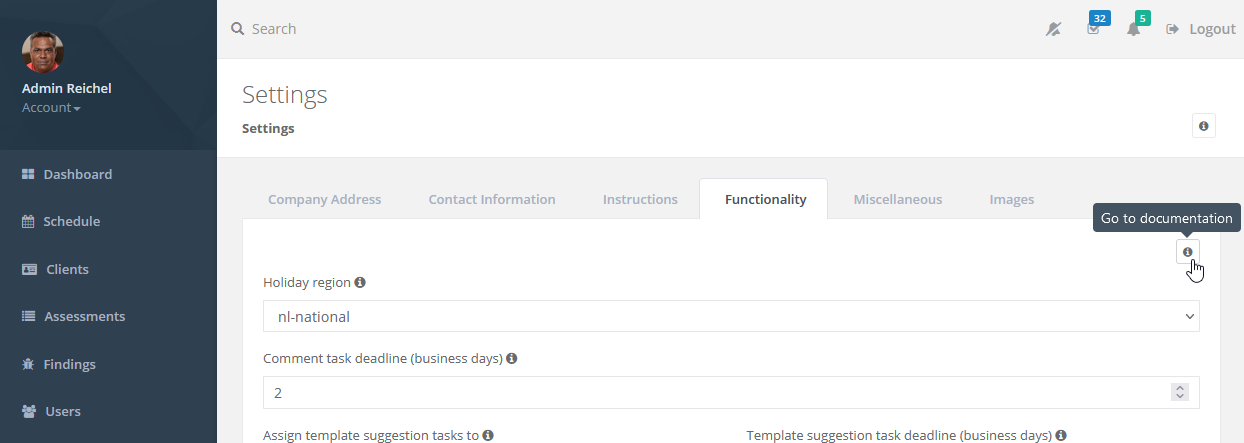
Documentation is now available in Reporter

The Reporter documentation has been added to the Reporter installation and is available to all admins and researchers from the main menu. In addition, all pages in Reporter now have a button that takes you directly to the most relevant section of the documentation for that page.

Reporter docs

Documentation has been added for settings pages, and existing documentation on the use of Reporter has been expanded.

Linking potential findings

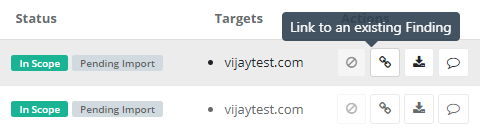
Added the ability to link potential findings to existing findings in an assessment. By linking a finding from an external tool to an existing finding, you can tell other researchers and reviewers that it does not need to be imported because the other finding already covers it. 

reporter link to existing finding

You should link potential findings when multiple tools detect the same vulnerability or when a tool finds similar issues that you want to combine into one.

Other improvements

  • The report buttons now appear more prominently on the assessment page.
  • Clients will now see a variety of notifications or warnings if reports are being generated or when they are potentially out-of-date.
  • A user downloading a PDF report or ZIP export, or viewing the online report is now logged as activity.
  • It is no longer possible to change the name of a snippet that is in use as this would break the snippet.
  • The 'Submit assessment for review'-button now also appears when there is one finding, instead of requiring more.
  • Sections of disabled assessment types now show a 'Disabled' badge when selecting them for finding templates.

Bugfixes

  • The sorting of targets in the assessment overview is fixed.
  • Fixed a bug where the sub-menus of the main navigation did not show when the menu was minimized.
  • Fixed a bug where changes made to a newly created phase were not saved.
  • Fixed an issue where it was not possible to select certain dates for phases.
  • Fixed an issue where tooltips for the names of the sender of an in-app notification were hidden.
  • Fixed an issue where long diffs took a very long time to load.
  • Fixed an error when deleting an assessment.
  • Fixed an error when creating a new text box item.
  • Fixed a bug where creating an 'under review' retest would put the 'review requested' event in the wrong place.
Read more

2021.12.29

Download Show checksums

Improved targets overview

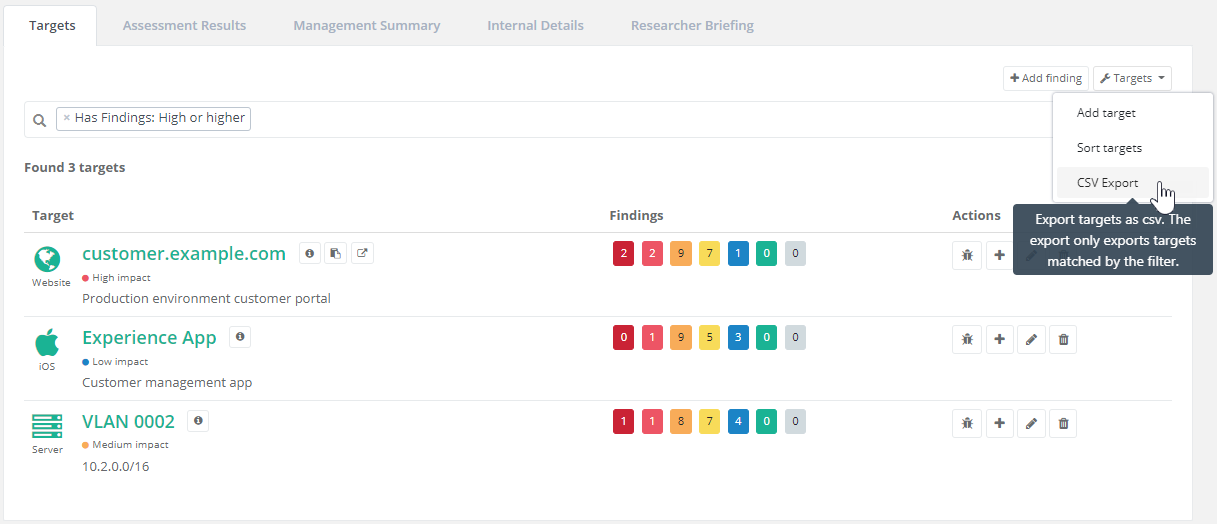
The target overview has been restyled for a better presentation of assessments with many targets. Filtering, searching and CSV export functionality has also been added.

reporter_targets_csv_export

Disable assessment types

  • Added functionality to disable assessment types. This is useful for clearing up assessment types that you no longer use. For example, switching from OWASP 2017 Top 10 to the new 2021 version.
  • Disabled assessment types can not be selected when creating a new assessment.

New status 'On Hold' for assessments

  • Assessments can be put 'On Hold' from the assessment edit page under the 'Status and Phases' tab.
  • Existing '... when completed' permissions are now simplified as 'work on locked assessment'. This allows users to keep working on assessments that are 'On Hold' or 'Completed'. Other users can not work on an assessment while it is 'On Hold' or 'Completed'.
  • Researchers are notified when an assessment has been switched to an 'On Hold' status.

Other improvements

  • The task counters in the researcher panel now update when (un)assigning or (un)completing tasks.
  • The schedule can now be filtered by assessment status.
  • Assessment Phases can now be scheduled from the Schedule page.
  • The API documentation has been restructured for better readability.
  • Added several API routes:
    • GET routes for Assessment Types and Targets.
    • POST routes to create Targets, Clients, Assessments, and Users.
  • The assessment page now always shows the initial and latest retest phase's start and end dates (as applicable). The next deadline is only shown to researchers.

Bugfixes

  • Fixed an exception rendering a specific type of task on the task index page.
  • Fixed a bug where pasting files in markdown fields did not upload the file.
  • Fixed a bug where an imported target could be matched to a target in a different assessment.
  • Fixed an issue where a blocked user would show as 'John Doe (deactivated) (deactivated)' in certain places.
  • Fixed a bug where changing the OWASP risk rating 'low/low' setting would not update the severity of all models.


Read more

2021.11.30

Download Show checksums

Requires Attention

  • The changes to nginx.conf introduced in release 2021.11.25 are no longer necessary. See the Docker-Compose example that is available via the 'Download' button.

Improvements

  • Large files are now uploaded in chunks.
  • Various small improvements to the tool import UI.

Bugfixes

  • Fixed a JavaScript error when clicking the confirm all button in potential targets.
  • Fixed a bug where potential findings were incorrectly greyed-out.
  • Fixed broken tool icons on the finding show page.
  • Fixed the tool selector in the export instructions.
Read more

2021.11.25

Download Show checksums

Finding Import

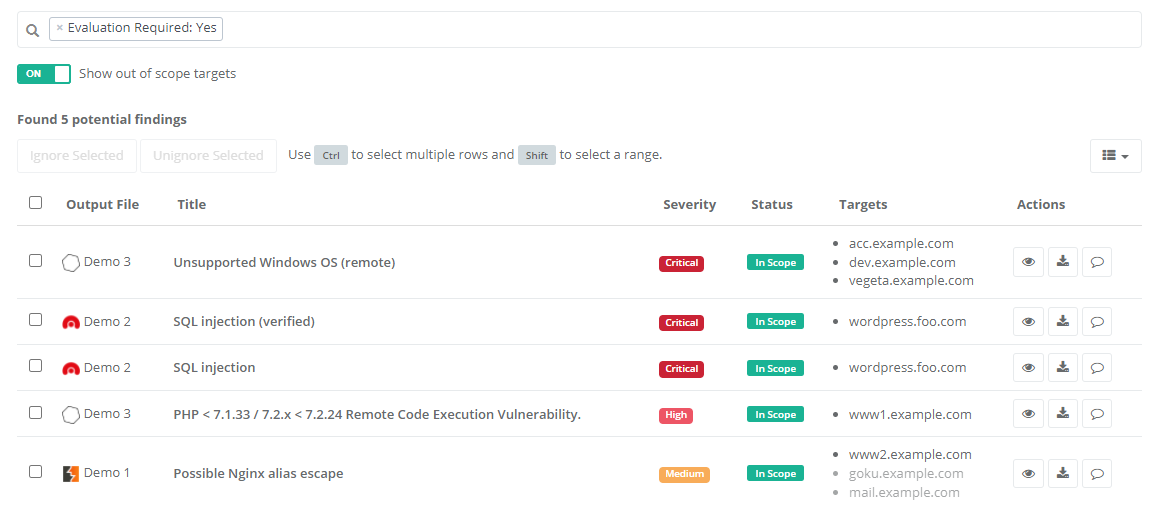
This release adds the ability to import findings and targets from files generated by over 120 different scanners and tools!
Reporter security scanners import

Go to the 'Tool Import' section in the assessment dropdown to begin. Upload a file, select the matching tool (such as Nessus, Qualys, Nmap, or Burp Suite) and let Reporter work its magic. Be sure to check the export instructions for your particular tool.

Reporter parses these files into an intermediate format. Researchers can then choose which targets and findings they want to import into the assessment. You can import targets in one click, and when importing findings Reporter will fill in as much as possible to make importing a breeze.

Requires Attention

In nginx.conf the following setting must be added to HTTP: client_max_body_size 250M; to allow larger file uploads.

The default researcher and reviewer roles can now create targets. This is done so they can import targets from files. Custom roles are not updated automatically. They should be updated manually by granting them the 'Create Targets' permission.

As of this release, file storage is no longer encrypted by Reporter. The storage should be encrypted through a cloud storage provider or local encryption. See the Security chapter of the documentation. Because of this change, the update may take longer than usual when all existing files are decrypted.

Markdown Standard Changes

*italic* is now the default notation for italics. Underscores in words, such as in a_b_c are no longer interpreted as italics.

Newlines in paragraphs are now rendered as new lines. For example:

line 1.
line 2.

used to be rendered as:

line 1. line 2.

From now on, it will instead be rendered as:

line 1.
line 2.

Improvements

  • Changing internal fields in the assessment, such as internal details, no longer regenerates the PDF reports.
  • Setting an assessment to the status 'Scheduled' with a start date today or in the past now sets it to the status 'Active' instead.

Bugfixes

  • Fixed a number of cases where new reports weren't generated when they should be.
  • Fixed an issue where the researcher panel filter reappeared after being unset.
  • Fixed a bug where the tasks assigned mail had an incorrect link.
  • Fixed a bug where storing an 'Under Review' finding would fail to create a 'requested a review'-event and review task.
  • Fixed a bug where storing a 'False Positive' retest would set the severity to 'OK' instead.
  • Fixed a bug where the wrong tab would briefly start open on the assessment page.
  • Fixed a bug where empty lines in non-highlighted code blocks did not appear in the pdf reports.
  • Fixed a bug where clicking on a locked section in the researcher panel would redirect to the dashboard.

Supported Tools

  • Acunetix
  • Acunetix 360
  • Anchore-Engine
  • Anchore Enterprise
  • Anchore Grype
  • AppSpider
  • Aqua
  • Arachni
  • AuditJs
  • AWS Prowler
  • AWS Security Hub
  • Azure Security Center Recommendations
  • Bandit
  • Black Duck
  • Black Duck Component Risk
  • Brakeman
  • Bugcrowd
  • Bundler Audit
  • Burp Enterprise
  • Burp GraphQL
  • Burp GraphQL API
  • Burp XML
  • CCVS Report
  • Checkmarx OSA
  • Checkov
  • Choctaw Hog
  • Clair
  • Clair Klar
  • CloudSploit (AquaSecurity)
  • Cobalt.io
  • Cobalt API Import
  • Contrast
  • Coverity API
  • Crashtest Security
  • CredScan
  • CycloneDX
  • DawnScanner
  • DefectDojo Generic
  • Dependency-Check (OWASP)
  • Dependency-Track (OWASP)
  • Detect-secrets (Yelp)
  • Dockle
  • DrHeader
  • DSOP
  • ESLint
  • Fortify
  • GitHub Vulnerability
  • GitLab API Fuzzing
  • GitLab Container Scan
  • GitLab DAST
  • GitLab Dependency Scan
  • GitLab SAST
  • GitLab Secret Detection Report
  • Gitleaks
  • Gosec Scanner
  • HackerOne
  • Hadolint
  • Harbor Vulnerability
  • Horusec
  • huskyCI
  • IBM AppScan DAST
  • Immuniweb
  • IntSights
  • JFrog Xray
  • KICS
  • Kiuwan
  • Kube-bench
  • Micro Focus WebInspect
  • MobSF
  • Mobsfscan
  • Mozilla Observatory
  • Nessus (Tenable)
  • Nessus WAS (Tenable)
  • Netsparker
  • Nexpose XML 2.0 (Rapid7)
  • Nikto
  • Nmap
  • Node Security Platform
  • NPM Audit
  • Nuclei
  • OpenSCAP
  • OpenVAS CSV
  • OssIndex Devaudit
  • Oss Review Toolkit
  • Outpost24
  • PHP Security Audit v2
  • PHP Symfony Security Check
  • PMD
  • Qualys
  • Qualys InfraScan WebGUI
  • Qualys Web App
  • RetireJS
  • RiskRecon API Importer
  • SARIF
  • Scantist
  • ScoutSuite
  • Security Knowledge Framework
  • Semgrep JSON
  • Snyk
  • Solar appScreener
  • SonarQube
  • Sonatype
  • SpotBugs
  • SSL Labs
  • SSLScan
  • SSLyze
  • Terrascan
  • Testssl
  • Tfsec
  • Trivy
  • TruffleHog
  • TruffleHog3
  • Trustwave
  • Trustwave Fusion API
  • Twistlock
  • Veracode
  • Visual Code Grepper (VCG)
  • Wapiti
  • Wfuzz
  • WhiteHat Sentinel
  • WhiteSource
  • WPScan
  • Xanitizer
  • Yarn Audit
  • Zed Attack Proxy
Read more