Releases

2025.12.11

Download Show checksums

Elasticsearch and Redis updated

Breaking change, read the upgrade guide! - Likelihood of Impact: Very High

Reporter has been updated to use Elasticsearch 8 and Redis 8. You MUST upgrade to Elasticsearch 8 and Redis 8 as part of this upgrade! Reporter will not be compatible with Elasticsearch 7 after this upgrade.

Use the following instructions to set up Elasticsearch 8 and Redis 8:

Upgrade Guide

Dynamic comparison operators for API filters

You can now use comparison operators in API filters for exact fields by prefixing the field name. For example, filter[severity]=<2 returns records where severity is less than 2.

OperatorDescriptionExample
(none)Equal tofilter[severity]=2
<>Not equal tofilter[severity]=<>2
<Less thanfilter[severity]=<2
<=Less than or equal tofilter[severity]=<=2
>Greater thanfilter[severity]=>2
>=Greater than or equal tofilter[severity]=>=2

New checklist templates

The following checklist templates are now available:

  • OWASP AI Testing Guide - Version 1
  • OWASP Top 10 for LLM Applications - version 2025
  • OWASP Mobile Top 10 - version 2024
  • OWASP API Security Top 10 - version 2023
  • OWASP Top 10 CI/CD Security Risks - version 2023
  • OWASP Kubernetes Top 10 - version 2022
  • OWASP Cloud-Native Application Security Top 10 - version 2022
  • OWASP Top 10 - version 2021
  • OWASP Docker Top 10 - version 2020
  • OWASP Internet of Things Top 10 - version 2018

You can add any of the new templates if you are an admin or a checklist template manager by following these steps:

  1. Go to the Checklist templates page.
  2. Click Clone default template.
  3. Select the template you want to add.
  4. Click Create fresh copy of template.

new checklist templates instructions

Improvements

  • [todo] tags are now also rendered in text fields, for example, in the title of the finding (template) edit page.
  • The assessment wrench dropdown menu has been restructured for improved clarity.
  • Targets on the finding show page are now rendered as links. Clicking on a target opens a modal with its details.
  • Add storage and Elasticsearch info to the status report.

Bug Fixes

  • Updated several third-party dependencies.
  • Fixed inconsistent expand/collapse behaviour in the checklist table.
  • Fixed an error that occurred when loading the researcher panel in certain assessments.
  • Resolved out-of-memory issues and a MySQL packet limit issue with the tool import.
  • Fixed a bug where test cases on the finding show page would not open the checklist modal after using inline edit on another field.
  • Fixed an issue where unclosed callouts in markdown were not rendered properly or caused an error.
  • Fixed an error that caused documents to not be rendered correctly in the researcher panel target details.
  • Fixed a bug that prevented the project admins from seeing assessment activity.
  • Fixed a bug where filtering assessments by manager or researcher did not work.
  • Fixed broken links to "suggest" and "create templates from findings".
  • Fixed an error that occurred when trying to create a file custom field.
  • Fixed a bug that cause the result of a test case to become desynced from the related findings.
Read more

2025.11.12

Download Show checksums

Duplicate Assessments

With just a few clicks, you can now duplicate entire assessments, making this functionality perfect for setting up recurring engagements. Create your assessment once, then clone it for each new iteration or project. All your targets, structure, and even unresolved findings can be carried over.
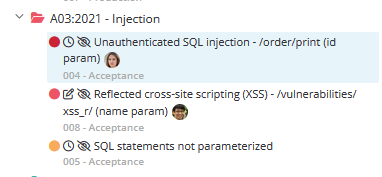
You can access the duplication feature from the Assessment dropdown on the main assessment page. When you duplicate an assessment, basic information and the assessment structure is always copied. Other elements, like the researcher briefing, targets, and unresolved findings, can be toggled. Duplicated assessments are always assigned a "Duplicated - Needs Review" tag, allowing you to find them easily. See the documentation for more details.

Duplicate assessments form

Targets in the Researcher Panel

Targets are now directly accessible from the Researcher Panel. Switch views using the new buttons in the top-left corner to easily jump between findings and targets.

In the Targets view, you can view details, create, edit, delete, and reorder targets without needing to refresh the page. This gives researchers and managers a smoother and more efficient experience.

Targets in researcher panel

Improvements

  • Added a new [mask] tag to the markdown editor that can be used to mask sensitive information, such as credentials, by default. An icon is displayed next to the mask, which can be used to reveal the contents.
    • Note that the content is not hidden in PDF reports!
  • Added retest icons to findings in the section view in the researcher panel that show the status of the latest retest.
  • Search indexing is now much faster. You should be able to use the search functionality much more quickly after a server restart.
  • Task indicators are now red if you have overdue tasks, and orange if you have tasks due today.
  • You can now assign assessment tasks to global admins who are not assigned to the particular assessment.
  • Non-client users, such as researchers and assessment managers, now consistently see unpublished findings in all draft reports and on the web interface. For example, unpublished findings are now counted in report components that count findings by severity.

Bug Fixes

  • Fixed an issue where the loading indicator didn't disappear in the finding search modal.
  • Applying filters in the multi-filter search on the assessment index page now properly updates the URL.
  • The assessment analytics chart (second chart on the analytics page) now has clickable links.
  • Sections with todo tags now again have warning icons.
  • Fixed a bug that would prevent the schedule from loading.
  • When creating a new finding, the "Found At" field is now correctly prefilled with the current time in the user's timezone.
  • Importing an assessment template with incomplete translations no longer causes an error.
  • Fixed a bug that caused the checklist template names not to appear in the assessment template form.
  • Fixed a bug that caused the assessment template edit page to sometimes not render properly.
  • Fixed some issues with finding template suggestions and linked findings.
  • Fixed a bug where some finding fields were missing from the API docs and Zapier integration
  • Made downloading findings as CSV a lot faster, preventing timeouts.
  • Fixed an issue where the reports table component would incorrectly show resolvers when used in markdown fields.
  • Tasks to revise an assessment section now complete when you request a new review.
  • Changing a reviewable from "Draft" to "Revision requested" now completes the task to complete the reviewable.
Read more

2025.10.01

Download Show checksums

Assessment templates and editor

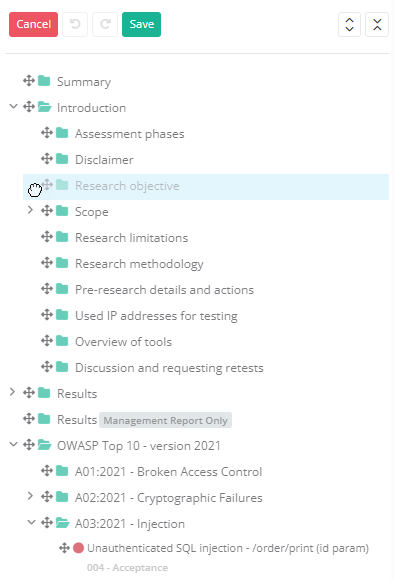
The assessment template editor has been completely redesigned. You can now configure the entire assessment template, including all its sections, in a single form. Sections can be reordered with drag-and-drop, properties can be modified on the spot, and translations can be added directly without leaving the page. All changes are saved at once, making it much easier to maintain templates.

Alongside the new editor, several new assessment templates have been added, and existing ones have been updated. To use them, click the 'Clone default template' button on the Assessment Templates page.

New assessment templates

The following templates are now available:

  1. OWASP Top 10 for LLM Applications (2025)
  2. OWASP Top 10 CI/CD Security Risks (2023)
  3. OWASP Cloud-Native Application Security Top 10 (2022)
  4. OWASP IoT Top 10 (2018)

Updated templates

The following templates have been updated:

  1. Microsoft Cloud Security Benchmark (v1 → v2)
  2. CWE SANS Top 25 (2022 → 2024)
  3. OWASP Mobile Top 10 (2016 → 2024)
  4. OWASP API Security Top 10 (2019 → 2023)

Syntax highlighting combined with mark tags

Syntax-highlighted code blocks now also support [mark] tag highlighting! Previously, [mark] highlighting only worked in plain code blocks without syntax highlighting. With this update, you can now combine the two, making it easy to call out specific parts of code, HTTP requests and responses, data snippets, and more, without sacrificing readability.

Python API wrapper updated

The Python API wrapper has been updated to include the latest endpoints, making integrations easier to set up and maintain. It is available on PyPI: https://pypi.org/project/securityreporter/. The full details can be found on GitHub: https://github.com/dongit-org/python-reporter.

Improvements

  • The tagging feature in the Markdown editor can now be accessed directly from a toolbar button, making it easier to add tags without remembering shortcuts.
  • The category name format in checklist tables is now customizable, just like the test case name format.
  • The default PDF report filename now includes the client’s name for easier identification and organization.
  • The checklist depth limit has been increased to 5, allowing more levels of nesting in checklist templates.
  • Findings from previous assessments can now also be imported into the current one via the Add finding dialog.
  • The order of severities in report components such as the "finding counts by severity" table, the "findings by severity" chart, and the "findings by severity and status" bar chart can now be reversed.

Bug fixes

  • Fixed a bug in the checklist table, where expanding or collapsing one category would sometimes cause a different category to be expanded or collapsed.
  • The checklist editor no longer occasionally incorrectly fails validation with a "test case code is duplicate" error message.
  • In the PDF report's table of contents, dotted lines now appear after all sections, if that setting is enabled.
  • In the online report's table of contents, sections no longer overlap.
  • In the PDF report, all URLs now get the correct color.
  • In the online report, when inline editing Markdown fields, the assessment language is now used to render the result, instead of the default language.
  • When making a new assessment checklist, the IDs and codes now get correctly copied over from the template categories.
  • Report generation no longer crashes when a finding has a multiselect custom field where the "Show as a badge" option is set to false, or where specific enums (such as Assessment Status) are used for the values.
  • The "Download default SVG backgrounds" button that was removed from the theme editor is now added to the theme index page, under the "Theme" dropdown.
  • When editing a task, the description text area now expands to fit its contents.
  • If the user tries importing targets using an invalid CSV file, a validation error is now shown.
  • The "findings by import status" and "checklist table" components can now also be previewed in the context of an assessment template.
  • Report compilation no longer crashes on certain inline code fragments if the report language is not set to English.
  • In the API, includes can now again be passed using the "array notation" (?include[]=assessment&include[]=user). Due to a bug, only "comma-separated notation" (?include=assessment,user) would be accepted.
  • The "list custom fields" endpoint in the API now returns a paginated response, consistent with other "list" endpoints.
  • Report pages can now again be included with themes through the API
Read more

2025.08.27

Download Show checksums

Flexible report layout

You can now insert fully custom pages anywhere in your report theme, each with its own layout, structure, and styling. This makes it easy to include elements like a disclaimer, cover letter, or dedicated contact page, designed exactly the way you want. Previously, text boxes and backgrounds could only be added to the front, back, and content pages.

Flexible report layout

Page Features

A page (like the content page) is rendered as one unit, but may span multiple physical pages in the PDF report. Each page includes the following options:

  • Visibility: Choose whether the page appears in the full report, the management report, or both.
  • Custom fields: Display content from a client-specific or assessment-specific custom field.
  • Backgrounds: Configure different backgrounds. These backgrounds can be overridden within an assessment.
  • Text boxes: Add static content to the page. For multipage pages, text boxes can be shown on all pages or restricted to just the first or last.
  • Margins: For content pages, you can now add extra top margin to the first physical page to make room for a text box that only appears there, such as a letterhead.

Highlighted HTTP requests and responses

Syntax highlighting for HTTP requests and responses has been added to code blocks. The body is highlighted based on the Content-Type header, making it easier to read and review. Naturally, this is also perfectly rendered in the reports.

👉 Also keep an eye out for the next release, we'll be adding support for working mark tags in syntax-highlighted blocks!

Security Reporter HTTP request response highlight


Improvements

  • Added 'Create Retest' buttons to the top of the finding page and retest requests for improved usability and clarity.
  • If you can't edit the status or severity of a finding due to a pending retest, a link is now shown to edit or create the retest.
  • You can now disable the priority and/or complexity columns in the 'Action Plan Table' component.
  • Moved the 'Table Styles' option from 'Templates' to 'Settings' in the main menu.
  • Removed unnecessary tooltips from the markdown editor.

Bug Fixes

  • Fixed a crash when creating findings due to duplicate IDs.
  • Fixed strange behavior when opening and closing checklist categories.
  • Fixed a bug in the findings table component where it displayed dummy targets instead of the assessment's targets.
  • Finding numbers now properly have leading zeroes in the findings table and action plan table components.
  • URLs in code captions now correctly open in a new tab.
  • Fixed a bug where the visibility settings of a section could be incorrect.
  • Fixed filtering models by tag.
  • Fixed certain modals not closing with the escape key.
  • Fixed a crash in the assessment template edit page when using the "show if has findings" visibility option.
  • H1 headers from markdown fields no longer have extra space above when they appear at the top of the page in the PDF report.
  • The margin below figure captions is now consistent with other captions in the PDF report.
  • Formatting shortcuts now work inside code block captions.
  • Floating edit buttons no longer hide behind callout blocks.
  • Fixed bug that caused suggestions to not load in the add finding modal.
  • Wide tables now always render full width the the HTML report.
    • You can force a table to be full-width by adding a large number of spaces to one of the cells. You can then control the relative size of the columns by changing the number of dashes in each row in the second line of the table.
  • Fixed simultaneous edit functionality for assessment custom fields
  • Limited report components are now available in finding templates and several other markdown fields outside of the assessment context.
  • The test cases field is no longer shown in the finding edit page when there are no test cases in the assessment.
  • Fixed an issue where the wrong names were shown in the non-PDF version of the 'Started On' component.
  • Fixed table of contents links to unnumbered sections in the PDF report.
Read more

2025.07.29

Download Show checksums

API changes

Breaking change! - Likelihood of Impact: Very Low

The clonedTo and clonedFrom includes for findings have been renamed to importedTo and importedFrom. The events in the timeline relating to importing have been renamed from FindingCloneEvent to FindingImportEvent, and they now only appear on the original finding.

Checklists for Complete and Auditable Security Assessments

Checklists are now available, helping teams deliver more reliable, complete, and auditable security assessments. You can use any checklist you need, choosing from predefined industry standards or creating your own to match your methodology, ensuring every test case is thoroughly tested and documented.

Security Reporter - OWASP WSTG checklist

Highlights

  • Start with the included templates, with more coming in future updates.
  • Use only the checklist levels you need, such as Level 1 and Level 2 from OWASP ASVS, while excluding Level 3.
  • Create custom templates to match internal testing methodologies.
  • Attach checklists to assessment templates so new assessments include the right checklists automatically.
  • Include checklist results directly in your reports with the new Checklist Table component, featuring flexible display options and full customization via 'Report Theme' settings.
  • Assign test cases to researchers and track progress in real time.
  • Access checklists and test cases instantly from the researcher panel.
  • Attach findings and comments to individual test cases as proof.

Getting Started

  1. Add a checklist to an assessment on the main assessment page using the 'Assessment Settings' dropdown (the button with the wrench icon).
  2. Access the added checklist either via the researcher panel or the 'Checklist' tab.
  3. Start testing! Each test case begins as Not Tested. Researchers can mark cases as Not Applicable, Passed, or Failed, and attach supporting evidence.
  4. For more details on configuring and using checklists, see the documentation.
OWASP ASVS checklist

Component Preview

When adding components like dynamic tables to markdown fields, you will now see a live preview with the selected options. This means you no longer need to reference the documentation to figure out what each component or option does.

For assessments, previews are generated using data from that assessment. For assessment templates, dummy data is used instead.

Component preview in action

Other Improvements

  • Activity is now logged when a user views an assessment or finding. In the API, every finding or assessment object that is returned is also logged, regardless of which route is used.
  • When importing a finding from a previous assessment, the finding no longer has a separate created event and import event.
  • You can now set assessment sections to appear in reports only if the section itself or one of its children has findings.
  • Added new target types 'Gameplay', 'Smart contract', 'Web3 application', 'Source code' and 'Network'.
  • Added includes for allComments and allEvents to findings in the API. This gets all comments or timeline events, including replies.
  • 'Finding status changed'-notifications are no longer sent to researchers.
  • Researchers are no longer notified about retest requests being cancelled if they do not have permission to create retests.
  • Assessments with the 'Retest Requested' status are now considered locked (similar to 'On Hold' and 'Completed' assessments), preventing researchers from making changes.
  • You can now use the keyboard to interact with dropdowns in the markdown editor toolbar.
  • The markdown editor toolbar is now always visible when editing a large markdown field.
  • You can now assign users to assessments as 'Lead Researcher'. Marking a researcher as lead can help establish clear accountability within the team. This role may involve coordinating technical work, supporting other researchers, and helping ensure findings are consistent and well-organized. Responsibilities can vary based on your team's workflow.
  • Added documentation for which media file types can be uploaded. You can find the list in 'Documentation > General > Usage > Markdown Editor'.
  • File upload support has been extended:
    • Additional image and video formats are supported.
    • You can now upload a variety of audio files.
    • .7z and .tar.gz archives are now supported.
    • Any unsupported file type can still be uploaded by first compressing it into a .zip, .7z, or .tar.gz archive.
    • The related documentation has been improved.
  • New options for finding numbers and short ID:
    • You can display the finding number (e.g., 001) in the title of each finding in reports. You can find this setting in the Miscellaneous tab of the Report Theme settings.
    • The following options can be set on the assessment edit page, with defaults in 'Settings > General > Assessment Defaults' for new assessments:
      • You can now configure if the assessment short ID is included in finding short IDs. So the ID could be 'MyAssessmentShortId-001' or simply '001'.
      • You can now configure the minimum number of digits for finding ID numbers. So it could be '1', '001' or even '000001'. 

Bug Fixes

  • Fixed an issue where importing a finding from a previous assessment and changing its status or severity while in draft would trigger timeline events and notifications. These should only occur if the finding has been published.
  • Fixed an issue where imported findings retained the created_at timestamp from the original finding.
  • Fixed a bug where a file upload dialog would sometimes open when selecting text in a markdown editor.
  • Fixed an inconsistency in the markdown editor where an attachment’s extension sometimes differed from the one inserted into the markdown field.
  • Fixed missing example requests and responses in the API documentation.
  • Fixed an issue where deleting a retest request could leave findings stuck in 'Retest Pending' with no way to update the status.
  • Cancelling or deleting a retest request now always sets the finding back to the status it was before the request, instead of always setting 'Unresolved'.
  • Fixed a bug where sections could appear in the wrong order in some tables.
  • Fixed image scaling issues in the online report.
  • Fixed incorrect fonts and sizes being applied to some fields in the online report.
  • Fixed an issue where the preview of large images in the markdown editor prevented editing the caption.
  • The LinkedIn field for users can now only contain links to LinkedIn.
  • Fixed a bug where deleting a custom field would cause a '405 Method Not Allowed' error.
  • Fixed a bug on the schedule page where the 'Save changes' button did nothing when editing an assessment phase.
  • Fixed a bug in the markdown editor where the focus would remain on the markdown editor when opening the snippet dialog.
  • Fixed an issue that could prevent the 'General Settings' form from saving when certain results table options were selected.
Read more