Releases

2025.06.18

Download Show checksums

Researcher panel improvements

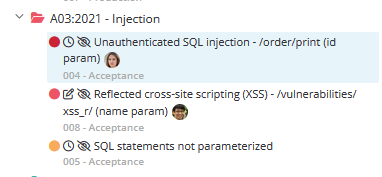
Researcher activity indicators

User icons are now displayed in the researcher panel, showing who is currently working on which finding and whether they have an active edit lock.


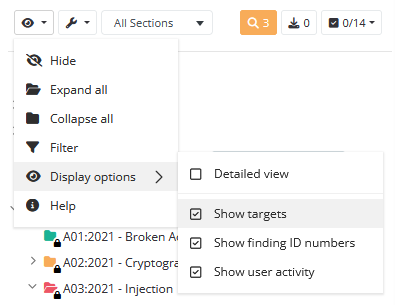
Visibility options

Added controls to fine-tune the information shown in the researcher panel.


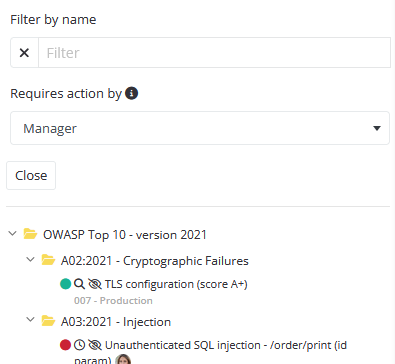
Roles-based filtering

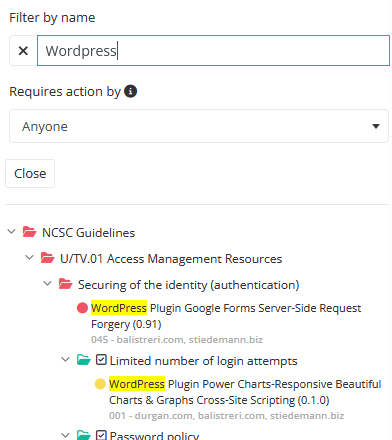
You can now filter findings and sections by role (Researcher, Reviewer, Manager). When filtering, only items requiring action for the selected role are shown. Section tooltips are updated accordingly.


Highlighting text matches

When filtering findings or sections, matching text is now highlighted matches easier to spot.


Improved UI and animations

Improved the alignment of the 'Complete Review' button in the header and added smoother interface animations.

Image scaling support

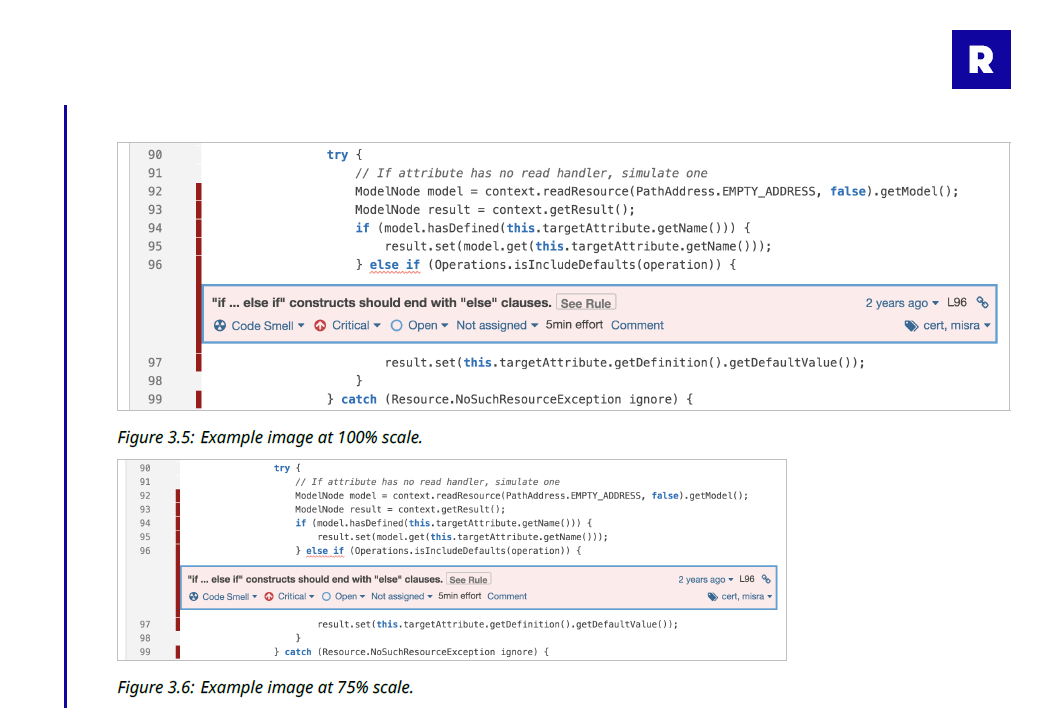
You can now scale images in reports using syntax like: ![caption](href){scale=50}. The scale value must be a percentage between 25 and 100.

Security Reporter scaling images


Business-day deadline offsets for tasks

Tasks now support deadlines based on business-day offsets. Instead of choosing a fixed date, you can define how many working days before or after a reference point the deadline should fall.

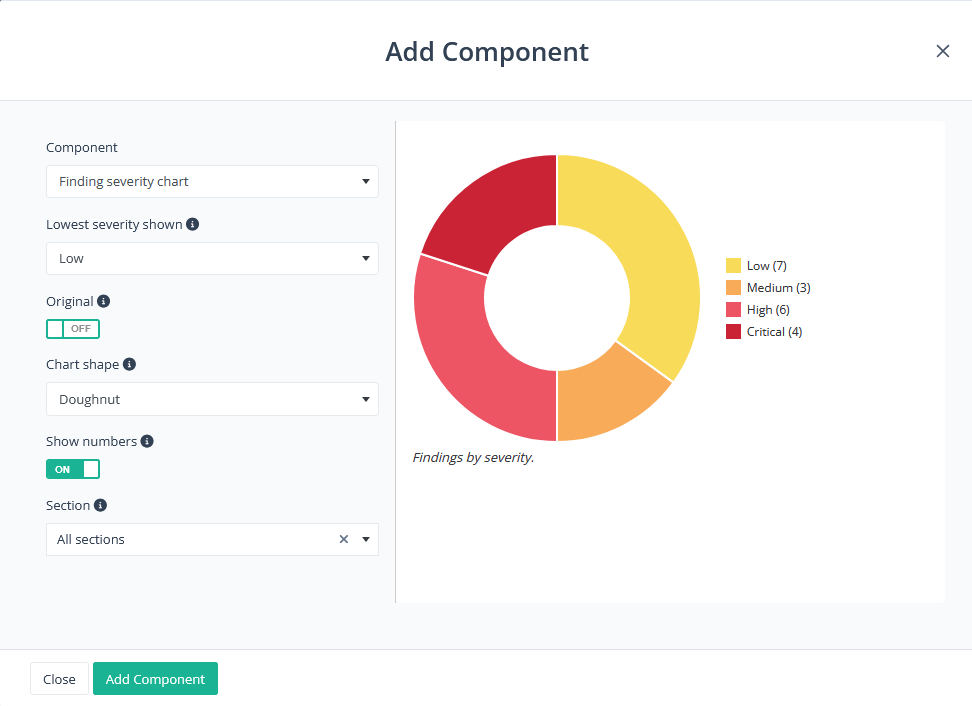
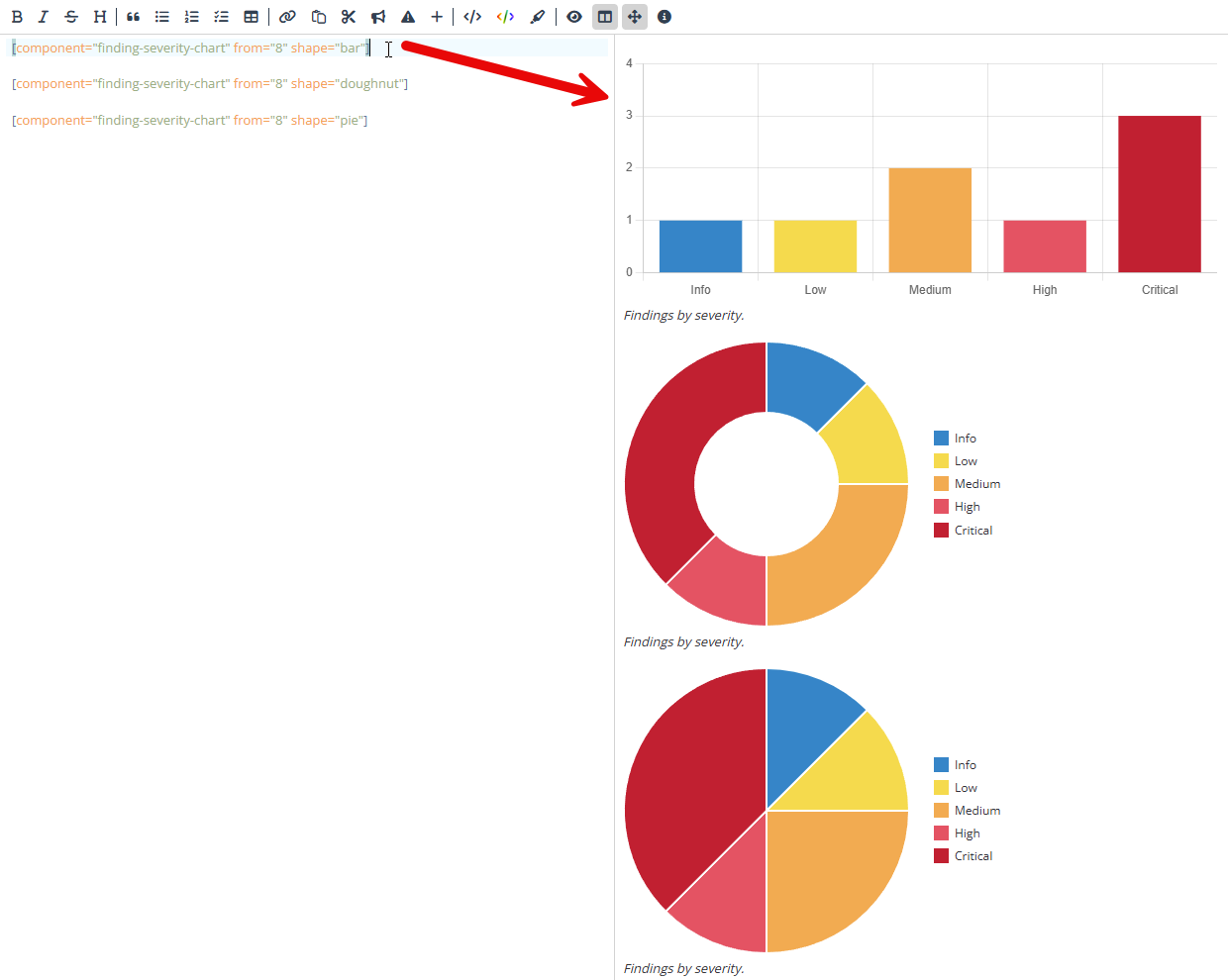
Bar chart option for 'findings by severity' chart

Added a new bar chart option to the 'Findings by Severity visualization. Also fixed: 

  • A discrepancy in how remediation days were counted

  • A missing section filter when selecting a specific severity

Finfing Severity Chart - Bar


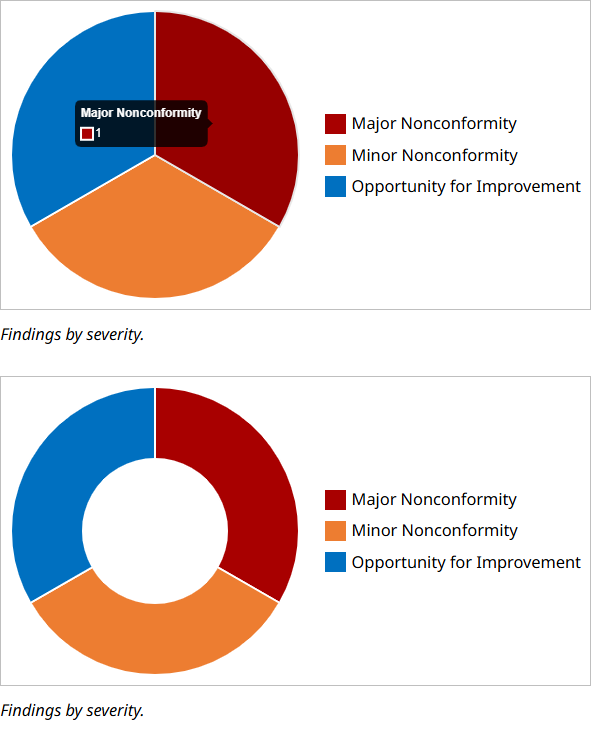
Consistent audit score terminology

Assessments using the audit scoring system now consistently display the correct severity names defined by that system, instead of the default 'Critical', 'High', 'Medium', 'Low', and 'Info' labels. Some examples:


Other Improvements

  • The finding status 'Partially Resolved' can now be set independently of resolved targets.
  • Active sessions are now invalidated when a user changes their password.
  • Removed auto assignments for answering assessment section comments.
  • Associated tags are displayed in the snippet modal.
  • Inline components can now be used in captions.
  • Table-style colors are now case-insensitive.

Bug Fixes

  • Fixed an issue where the tool filter on the Tool Import page did not respond to typed input.
  • Tools in the Tool Import dropdown are now sorted alphabetically.
  • Added an error message when a user attempts to upload an invalid file type.
  • Fixed a bug that allowed you to upload a .ttf file under Add font-family in Report Fonts.
  • Fixed a bug that prevented a user from searching by tag.
  • Corrected link colors in the HTML report for the Findings, Action Plan, and Results tables.
  • Toast notifications now appear correctly when uploading output files.
  • Fixed incorrect section highlighting in the Table of Contents side panel in the online report.
  • Resolved an issue that could break the researcher panel when creating a finding from a template.
  • Fixed occasional failures in PDF report generation when using non-Latin scripts.
  • Fixed a bug where forms related to assessments remained locked after a user finished editing.
Read more

2025.05.07

Download Show checksums

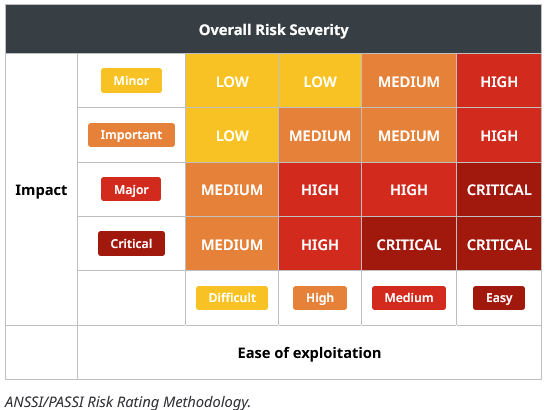
New Scoring System: PASSI

We’ve added support for the PASSI scoring system, developed by the French national cybersecurity agency ANSSI. This system uses a 4-point 'Impact' scale and a 4-point 'Ease of Exploitation' scale to determine the severity of findings, similar in approach to the OWASP Risk Rating Methodology.

Alongside this, we’ve introduced:

  • A new risk assessment table component for your reports.
  • A reusable scoring system description snippet to explain PASSI in your assessments.

Colored tables

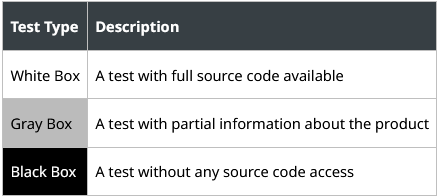
You can now create tables in Markdown with custom background and text colors. Define styling rules based on row and column numbers by going to Templates > Table Styles. Once set up, users can easily apply these table styles when adding tables in the Markdown editor.

Black- gray- white-box example

Highlights:

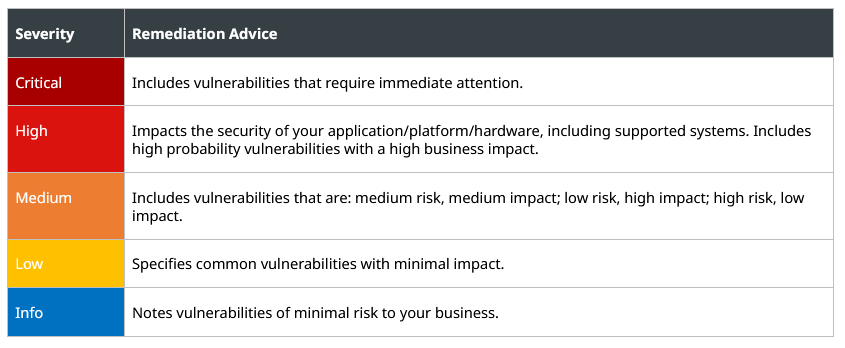
  • When making your table styles, you can use many of Reporter’s named colors (like critical severity) that automatically follow the report’s theme.
  • We have added two new colors: light table stripe and dark table stripe. You can customize them in your themes and use striped tables for readability.
  • You can also use custom colors that are independent of the theme.
  • We have added a 'Table style manager' role so you can control who can create and edit table styles.
  • When you apply a table style in a Markdown field, all style data is saved into the Markdown itself. This means you can safely delete unused table styles later without affecting existing reports.

Severity color example

Renumbering Findings

Findings in Reporter have a number that is unique and used as part of their short ID. Those numbers are assigned sequentially, and any deleted findings can cause gaps in the numbering. Since short IDs are used in client communication, we don't want to renumber findings automatically. But we recognize that many of you don't want gaps in the finding numbering and that you want to number them based on the order they appear in the report.

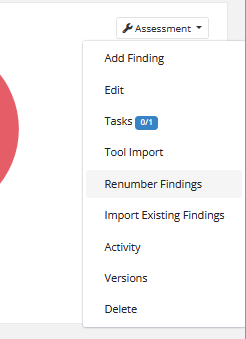
With all that in mind, we have added a feature to let you renumber the findings in an assessment. When you do, the findings are renumbered at that moment, but any new findings are added with the next available number. This ensures that finding numbers stay consistent unless you decide you want to change them. You can access this functionality from the assessment dropdown on the main assessment page:

Findings can be reordered based on:

  • Oldest finding first
  • Report order (by section, then severity)
  • Highest severity first

For more details, check out the documentation.

Improvements

  • You can now tag targets in markdown fields using $, similar to sections, users, and findings.
  • Client custom fields can now be added to the report using placeholders and a theme's text boxes.
  • Custom fields of the type ‘File’, created for assessments or clients, can now be rendered as images inside text boxes in your report themes. For example, this allows you to easily display the client’s logo on the cover page of your assessment reports.
  • You can now customize the front page and back page backgrounds for each assessment individually, directly from the assessment edit page.
  • The CWE classifications have been updated.
  • Added an environment variable called WEBHOOK_SSRF_HOST_WHITELIST to whitelist hosts for webhooks that can bypass SSRF header checks. This should be used for webhooks to external services like Slack where you can not control response headers. See Documentation > General > Settings > Webhooks for details.
  • You can now upload multiple tool output files in a single request, making it faster and easier to import results.
  • Added more details about account managers, including how they can be selected and linked under clients.
  • Added documentation about finding statuses.
  • Added instructions for using SFTP to connect to your storage for backups.

Bug Fixes

  • Fixed a bug where reactions showed the wrong emojis. Unfortunately, the bug caused the incorrect emojis to be saved in the database, so reactions to timeline events may now show different emojis than they did before.
  • Fixed a bug where the targets tab on the assessments page for completed or on-hold assessments was only visible to admins.
  • Fixed a bug where findings did not appear in the CSV export if they had no targets.
  • Fixed an exception when exporting findings to CSV if there were no findings to export.
  • Fixed an exception when using webhooks targeting an IP address.
Read more

2025.04.03

Download Show checksums

New Finding Statuses

Two new statuses have been added to findings: Partially Resolved and Unable to Verify. These are available alongside the existing statuses: Unresolved, Resolved, Retest Pending, and Accepted Risk.

Partially Resolved indicates that a finding has been resolved for some targets, but not all. When changing a finding's status to either Unresolved or Partially Resolved, Reporter will automatically determine the correct status based on which targets have been marked as resolved.

Unable to Verify is a manual status, similar to Accepted Risk. It is intended for findings that cannot be retested—for example, when another related finding has already been resolved, making verification of this one no longer possible.

We have also made the ordering of finding statuses more consistent throughout the application.

It is no longer possible to delete targets that have associated findings, because doing so would cause unintuitive changes to the findings' status.

Components per Section

The following report components can now be limited to findings within a specific section of the report:

  • Action plan table
  • Audit table *
  • Finding counts by severity
  • Findings by severity and status bar chart
  • Findings severity chart
  • Findings table
  • Results table (including management results table) *

For components marked with an *, only top-level sections can be chosen. By selecting a section, only findings in that section and any of its subsections will be shown or counted in the component. The captions have been updated to include the name of the selected section.

You can choose a section when adding a new instance of a component in the markdown editor, or when adding the components to assessment templates.

CVE Auto-link

When you add a CVE identifier—such as CVE-2024-20439—in a markdown field, it now automatically becomes a clickable link to a CVE database. For example, CVE-2024-20439 will link to: https://nvd.nist.gov/vuln/detail/CVE-2024-20439

By default, links point to nvd.nist.gov, but admins can configure them to use mitre.org, cvedetails.com, or a custom URL. Auto-linking can also be disabled entirely.

These settings can be adjusted under Settings > General > Functionality.

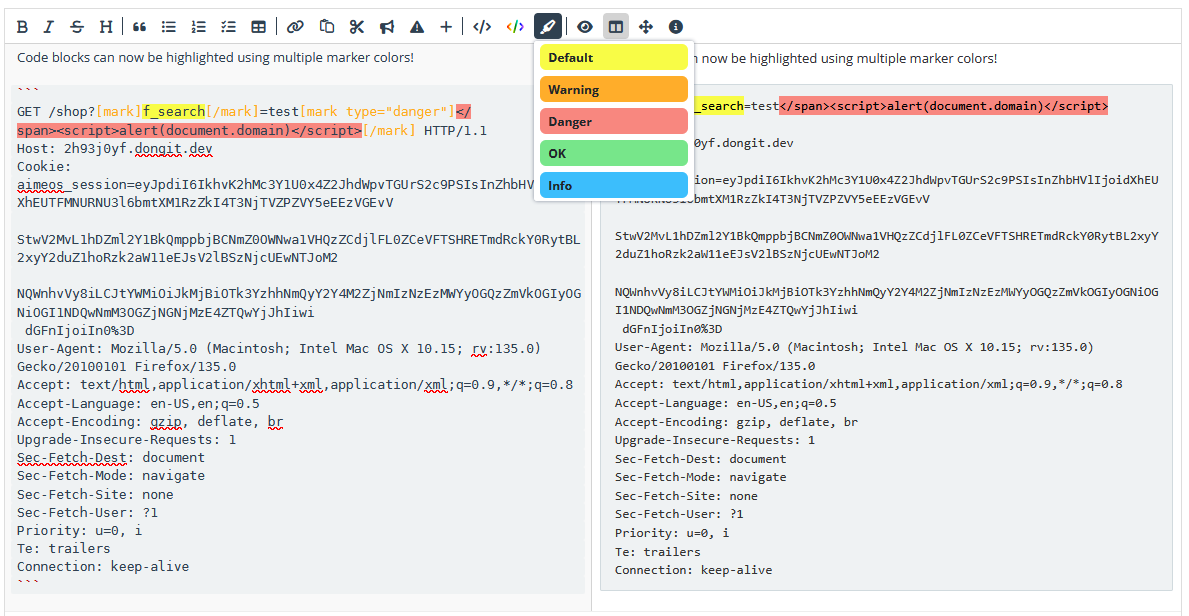
More Code Box Highlighting Options

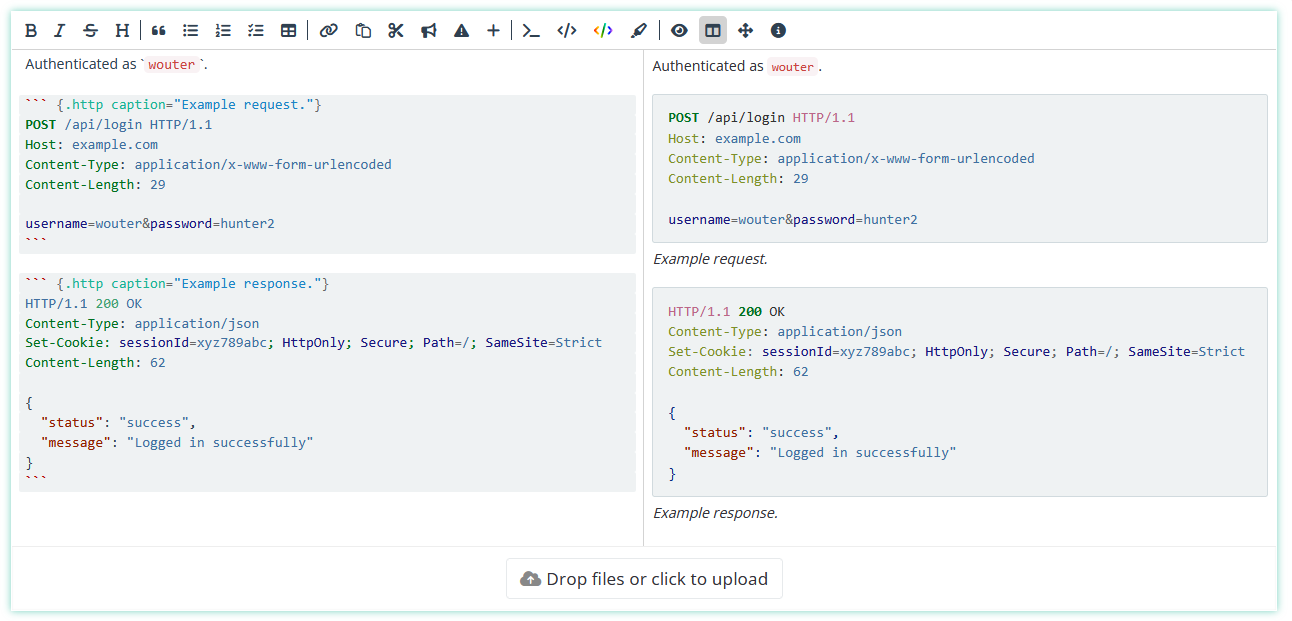
New [mark] styles have been added to the Markdown editor, allowing you to highlight specific lines or elements within code blocks more clearly.

Security Reporter code highlighting in code blocks

Other Improvements

  • Added separate permissions for adding, editing, removing, and reordering assessment sections. This will provide you with more granular control over custom assessment roles.
  • You can now use the !-tag to highlight sections in assessment templates.
  • Added new placeholder options for dates from the latest retest phase, or from the most recent phase (whether research or retest).
  • Notifications about draft reports now trigger a direct download of the report, instead of redirecting to the assessment page.
  • It's now possible to disable the dotted lines in the report's table of contents via the theme editor settings.
  • You can now customize the bullet style of bulleted lists in the theme editor.

Bug Fixes

  • Fixed an error that occurred when attempting to approve and/or publish an assessment section from the review page.
  • Fixed an issue that caused certain API routes to respond slowly.
  • Fixed a bug that prevented you from adding MIME type rules to file custom fields.
  • Fixed a rare issue where an assessment with a retest status (such as Retest Active), but no retest phase, was sorted in the wrong place.
  • Fixed an issue where the task count in the researcher panel was not always updated correctly.
Read more

2025.02.19

Download Show checksums

Tool Findings API enhancements & new webhooks

We've enhanced the API and webhooks to provide greater control and automation over findings and targets extracted from supported scanning tools like Burp and Nessus. With these new capabilities, you can:

  • Access & Manage Parsed Findings – Retrieve tool findings and targets, import them into assessments, and link them to existing findings or targets.
  • Mark Findings – Mark findings or targets as 'out-of-scope' or 'ignored'.
  • Automate Workflows – Use new webhooks to trigger actions when output file parsing is complete.
  • List Output Files – Retrieve and manage parsed tool output files via the API.

See the updated API documentation for full details.

Other improvements

  • Caution tags have been renamed to To-Do tags for clarity. All existing caution tags are automatically updated.
  • When requesting a review, approval, or publishing a finding with To-Do tags, you’ll now receive a warning.
  • An assessment’s research hours are displayed on the schedule page when assigning a phase.
  • The spacing around code, table, and figure captions is now more consistent.
  • You can now adjust the spacing between a code block, table, or figure and its caption.
  • Findings, users, and sections can be tagged immediately after an opening brace or parenthesis. For example, typing "in another finding (#finding:...)" will trigger the selection menu.
  • When importing findings from a previous assessment, references to findings or sections in the old assessment are automatically updated to their equivalents in the new assessment, whenever possible.

Bug Fixes

  • Resolved an issue where findings imported from a previous assessment were always published.
  • Fixed a bug where a published badge incorrectly appeared in retests in the PDF report.
  • Addressed an issue where findings moved to new sections in the researcher panel could still be found in the old section via search.
  • Fixed a bug where the 'Approve and publish' dropdown sometimes didn't appear.
  • Corrected an issue with empty multi-select custom fields.
  • Fixed a bug where videos attached to Markdown fields occasionally appeared twice in the online report.
  • Resolved an error when loading certain rare notifications.
  • Fixed an issue where non-custom short IDs on the assessment edit page were not automatically updated using the research start date.
  • Adjusted table margins to correct excessive spacing above text in some tables.
  • Fixed a rare exception when rendering the management results table to PDF.
  • Resolved an exception when rendering VRT classifications to PDF.
  • Fixed an issue in the results table component where resolved findings sometimes appeared in the wrong column.
  • Prevent lengthy usernames from overflowing from the menu and onto the page content.
  • The 'finding counts by severity' component (with the original severity option selected) now correctly links to the search page filtered by 'original severity' instead of 'current severity'.
  • Sections in the researcher panel now correctly display their folder color based on retest status.
Read more

2025.01.24

Download Show checksums

Improved researcher panel

We've revamped part of the researcher panel to make organizing your assessments easier and more efficient.

Rearrange sections and move findings between them with drag-and-drop simplicity in the new "reorder" view (accessible via the wrench icon).


Create and delete sections on the fly using the right-click context menu – no more page refreshes!


Access all section properties in a single, detailed view without leaving the page. Hover over icons for property details.


We have many more exciting improvements planned for the researcher panel to enhance your workflow further.

Highlight key details using callouts

Add visual emphasis to your content with callouts!  Callouts help you emphasize key information, making your reports clearer and more impactful. Plus, they're rendered perfectly in PDF exports for a professional look.

More control over publishing findings, sections, and retests

We've enhanced how you share information with clients, giving you greater flexibility and control. You can now publish findings, sections, and retests independently, regardless of the overall review status.

Previously, clients could see findings, sections, and retests in two ways: automatically when approved by a reviewer, or when manually set to "published" status. This happened even if the overall assessment wasn't set to a completed status, which sometimes caused confusion.

Now, you decide what clients see and when. Keep everything under wraps until the assessment is complete, or share critical findings, sections, or retests immediately – the choice is yours!

How it works:

  • Publish individual findings, sections, or retests at any time, even if they're still in draft status. This allows for early collaboration and faster response to critical issues.
  • When your assessment is finalized, you can publish everything with a single click.

Example: Share a critical "draft" finding with your client so they can begin mitigation right away. They'll see the "draft" status and understand that details may be refined later.

Enhanced control over automated backups

We've added greater flexibility and control to automated backups:

  • Customize the size limits for your automated backups to optimize storage usage.
  • Stay informed with email alerts for successful backup operations (previously only sent for failures).
  • Set a warning threshold to be notified when backups approach the total size limit, allowing you to take proactive action.

For detailed information, see Documentation > General > Configuration > Backups for details.

Retests now available without client requests

You can now initiate retests without needing a client request. This new assessment setting is ideal if you don't plan on giving clients access to Reporter.

With this setting enabled, you can use all retest functionality, including the review process, with greater flexibility and without requiring client involvement.

Set your default preference for this setting in Settings > General > Assessment Defaults to apply it to all new assessments.

Other improvements

  • Targets are now optional. You can now create findings without targets.
  • Researchers can now edit each other's retests.
  • You can now customize the vertical padding in tables in your report themes.
  • Added functionality to import and export assessment templates as zip files.
  • Improved logic for when new versions are created.
  • Greatly improved performance of the API documentation page.
  • You can now add the number of findings in each category to the labels of the finding severity chart report component.
  • Added an option to show the original severities in the finding counts by severity components.
  • You can now use most assessment custom fields as placeholders on the front page of your reports. 

Bug Fixes

  • Fixed a bug where the status of an assessment was not automatically set to scheduled when you set dates.
  • Fixed a bug where the markdown editor showed incorrect autocomplete suggestions when you are writing a code block caption.
  • Fixed missing translations for health check emails about automated backups.
  • Fixed a bug where you couldn't attach documents to a request for revision of an assessment section.
Read more