Upgrade notes
- This version includes updates to underlying components, including PHP, with important security fixes. We recommend updating all installations as soon as possible.
- This release adds database indexes that speed up deleting findings and assessments. On instances with a large activity history, the upgrade can take several minutes longer than usual.
Task overview by type
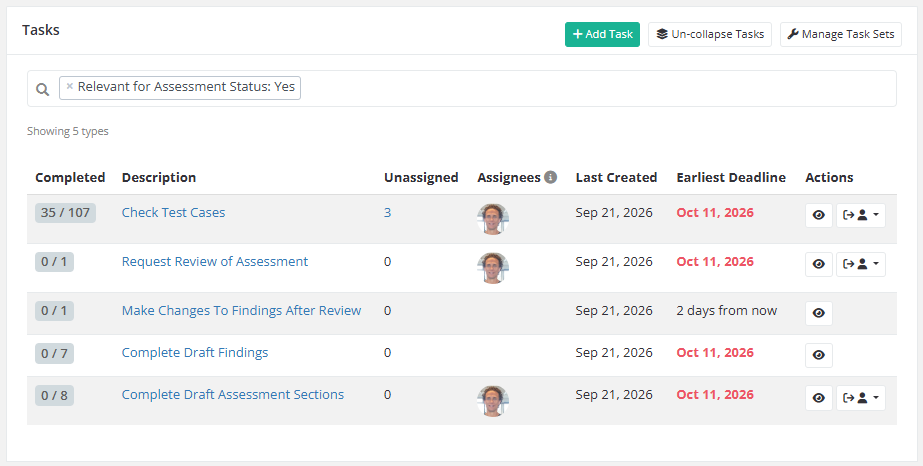
The tasks page of an assessment can now group tasks by type, so you can see at a glance where the work stands. Each row shows how many of its tasks are completed, how many are still unassigned, who is automatically assigned to new tasks of that type, and the earliest deadline. Overdue deadlines are shown in red.
Import findings through the API and MCP
Findings from earlier assessments of the same client can now be imported through the API, and MCP.
A new imported_to API field on findings also shows the ID of the finding it was imported into, or empty if the finding has not been imported. The field can also be used as a filter, for example to list only the findings that have not been yet imported,
Additional changes to finding import functionality
This release also makes some additional changes to the finding import functionality affecting the web portal as well:
- After a finding has been imported into another assessment, the original finding is now fully locked. Its assignees, remediation status, comments and custom fields can no longer be changed, and it can no longer be published, including its retests.
- When a finding cannot be imported, the error message now names the finding and the reason, for example that it has already been imported or has an unpublished retest.
- Duplicate assessment now skips findings that have an unpublished retest.
- The activity log now also shows which findings were imported, instead of only a count.
- Imports are recorded in the activity log of both the receiving assessment and the original assessment.
Improvements
- Reports for large assessments are generated significantly faster and use much less memory, so reports with many findings linked to many targets no longer run out of memory.
- Deleting findings and assessments is now much faster on instances with a large activity history.
- Assessment pages now load checklists only when they are shown, and group updates made by other users, which reduces the load during bulk changes through the API.
- Findings in the API can now be sorted by
number,short_idandseverity_score, for examplesort=-severity_score. - Snippets are now sorted by name by default, and creating a snippet now opens the new snippet.
- The researcher panel no longer shows reorder options for sections, targets or checklists when there is nothing to reorder.
- Uploaded SVG images are now better protected against malformed files, and third-party dependencies have been updated with the latest security fixes.
Bug Fixes
- Fixed a bug that would cause permission checks to be done inefficiently, especially noticeable in routes that return many models, such as API index routes.
- Fixed an issue where finding filters in the API could match on fields that are hidden from the API, which made it possible to infer their contents. Client custom field filters now also only match clients whose custom fields you are allowed to see. As a result, some filtered API requests may return fewer results.
- Fixed an issue where test cases sent when creating a finding through the API were not saved.
- Fixed an issue where updating a test case through the API without specifying
findingsremoved all of its linked findings. Linked findings are now kept unlessfindingsis sent; sending an empty list still removes them. - Fixed an issue where the API accepted
severity_metricsthat were not an object and silently ignored them. Such requests now return a validation error. - Fixed an issue where changing the template of an assessment could leave checklist components in the report showing Invalid checklist.
- Fixed an issue where the Resolved targets field in PDF reports listed the unresolved targets.
- Fixed an issue where the message for an empty section was missing from reports when all subsections of the section were hidden.
- Fixed an issue where side-by-side code blocks that started near the bottom of a page in a PDF report left an empty grey bar on that page.
- Fixed an issue where HTTP request and response bodies in code blocks were not highlighted when a
CookieorSet-Cookieheader came before theContent-Typeheader. - Fixed an issue where a code block directly below another code block lost its syntax highlighting in the Markdown editor when its caption contained backticks.
- Fixed an issue where the theme edit page failed to load after a theme preview was generated in a language other than the default language of the theme.
- Fixed an issue where cancelling an inline edit of a retest, comment or remediation status change did not discard the changes.
- Fixed an issue where a retest was always shaded as private while it was being edited, regardless of its review status.
- Fixed an issue where the Imported and Moved labels did not appear in the version history of a finding.
- Fixed an issue where importing a single finding from a previous assessment was not recorded in the activity log.
- Fixed an issue where sorting the snippets list by name, creation date or update date had no effect.
- Fixed an issue where the researcher panel did not show targets that other users had renamed or deleted.
- Fixed an issue where the researcher panel showed the Add target button outside the targets view.
- Fixed an issue where AI assistants connected through the MCP server could write finding references that did not link to the finding.