Upgrade notes: See the related sections below for details and required actions.
- Custom field names that start or end with an underscore, or contain two underscores in a row, are renamed automatically during the upgrade.
- Webhook conditions that reference related models now require the matching include.
- Users deactivated through SCIM are now suspended instead of blocked.
Suspend users without losing their access setup
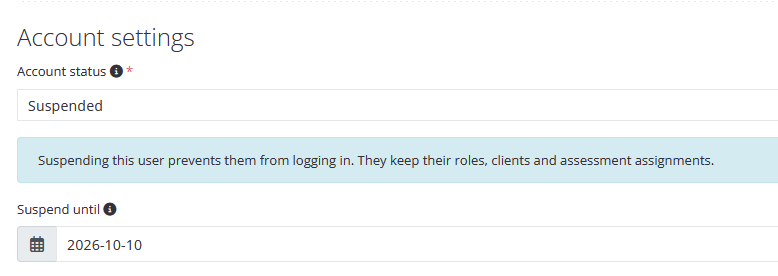
Users can now be Suspended as an alternative to Blocked. A suspended user cannot log in or use the API, MCP, or calendar export, and receives no emails. Their roles, client and assessment assignments, and API tokens are kept, so access is fully restored once the suspension ends. Blocking still removes all roles and assignments and revokes API tokens.
Select Suspended in the Status field when editing a user. Optionally, set Suspend until to have Reporter reactivate the user automatically on that day. Suspended users are marked as such throughout Reporter, and suspensions are recorded in the activity log. Through the API, set status to 3 and optionally provide suspended_until.
SCIM change - When your identity provider deactivates a user through SCIM, Reporter now suspends that user instead of blocking them, so reactivating them in your identity provider restores their previous access. Deleting a user through SCIM still deletes or blocks them as before. Users previously blocked through SCIM are converted to Suspended during the upgrade, but roles and assignments that were removed when they were blocked are not restored.
Draft reports with or without unpublished content
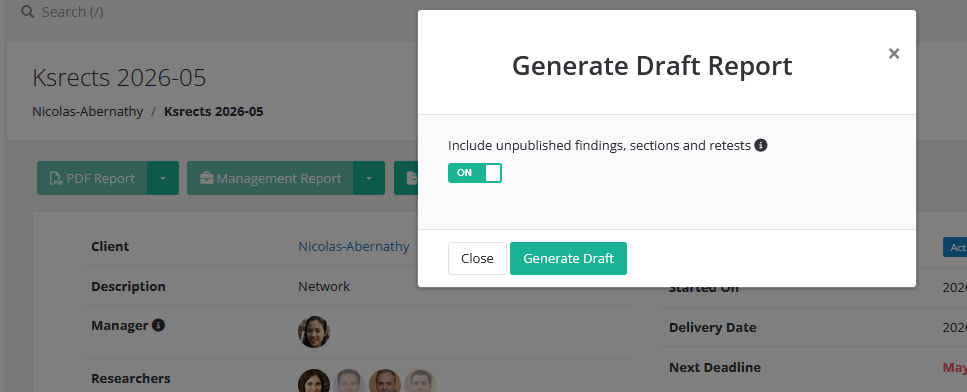
When generating a draft PDF report or management report, you can now choose whether to include unpublished findings, sections, and retests. Selecting Generate Draft opens a dialog with the Include unpublished findings, sections and retests option, which is enabled by default. Turn it off to produce a draft that shows only published content, for example to share an interim version with a client. Section titles are always included to keep the report structure intact.
Both variants are stored separately and can be downloaded from the draft menu as Download Draft (includes unpublished) and Download Draft (published only).
The online report now matches the PDF report when a section is unpublished: its published findings and subsections remain visible to users who cannot see the unpublished section, while the section's own content stays hidden.
More filters on the Analytics page
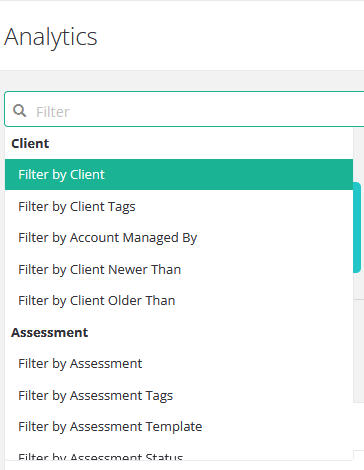
Many new filters have been added to the analytics page, such as assessment template, researchers, finding template, and remediation status, grouped into Client, Assessment, and Finding filters. Client and assessment filters now accept multiple values.
Clicking on an area of a chart leads to the assessments- or findings-overview with all the filters applied.
The findings overview also gains Finding Template and Finding Template Tags filters, and several client, assessment, assessment template, and language filters on the findings and assessments overviews now accept multiple values.
Findings by severity and remediation status
A new stacked bar chart shows how findings of each severity are distributed across remediation statuses, making it easy to see where remediation is progressing and where it is lagging behind. It is available as the Findings by severity and remediation status bar chart report component and as a new card in the Remediation section of the Analytics page.
Translation note - The chart's report captions use new translation strings. If you use this component with customized or non-English report translations, add translations for the new captions in Settings > Translations. Missing translations fall back to the default English text.
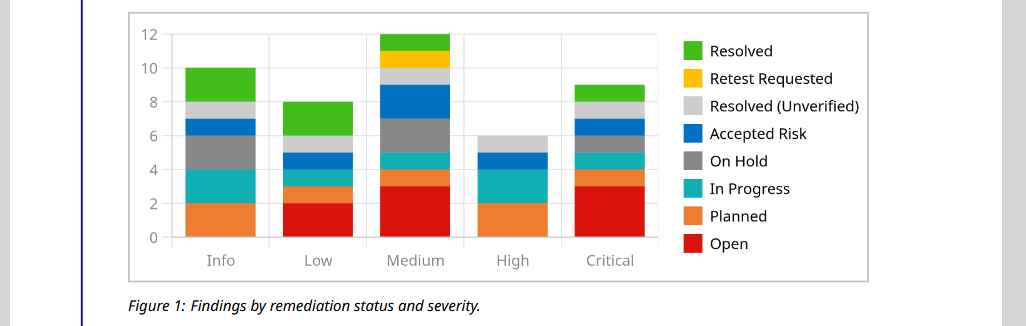
Tip: On installations upgraded from before February 2026, the Planned and Retest Requested remediation statuses may share the same color in existing themes. For a clearer chart, give them distinct colors in your theme, for example orange for Planned and yellow for Retest Requested.
Flattened webhook payloads and easier condition building
Webhooks can now send their payload as a single-level object using the new Send full models, flattened mode. This makes it easier to connect Security Reporter to receivers that cannot process nested objects or lists such as Slack. Nested keys are joined with two underscores __, for example phases__0__completed_at.
Writing webhook conditions is also easier: the new Add variable button next to Conditions lets you browse a preview of the payload and insert the matching expression with a click. Includes can now also be configured in Only send ID mode, where they are used to evaluate conditions without being sent.
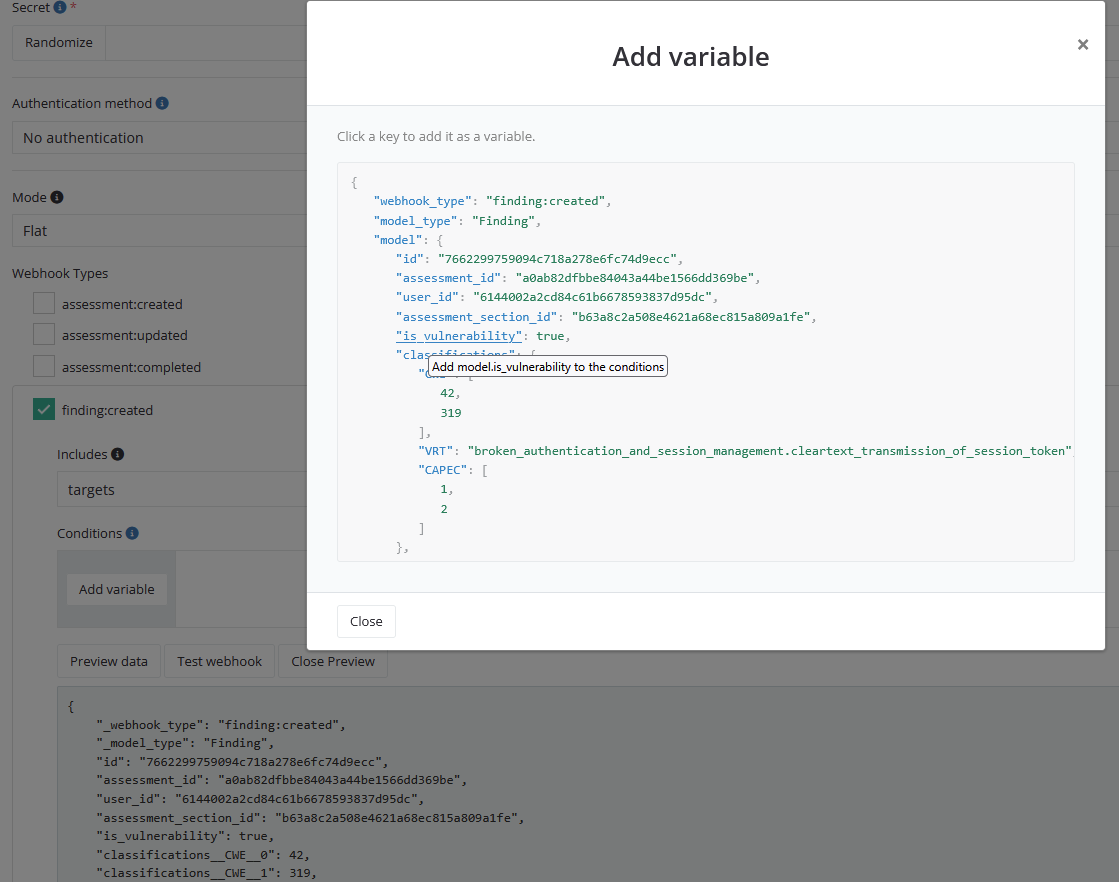
Breaking change - Webhook conditions can now only use data contained in the full payload. Previously, a condition could also reference related models that were not part of the payload. A condition such as model.client.name now requires the corresponding include (here client). Review your webhook conditions and add any missing includes.
Breaking change - Custom field names can no longer start or end with an underscore or contain two consecutive underscores. Existing custom fields with such names are renamed automatically during the upgrade, for example c__field___name_ becomes c_field_name, and references in Reporter are updated. API, webhook, and n8n integrations that use the old names must be updated manually. If such fields exist, the upgrade may take longer than usual.
Custom field default values
Custom field default values are now prefilled on the web forms for creating findings, finding templates, template suggestions, clients, and users, and when importing tool findings. Previously, defaults were not applied on these forms.
A default value is now stored on a record when it is created. Changing a custom field's default therefore no longer changes existing records. During the upgrade, existing records without a stored value receive the default they were displaying, so their content does not change.
Markdown defaults for finding and assessment custom fields can now include components.
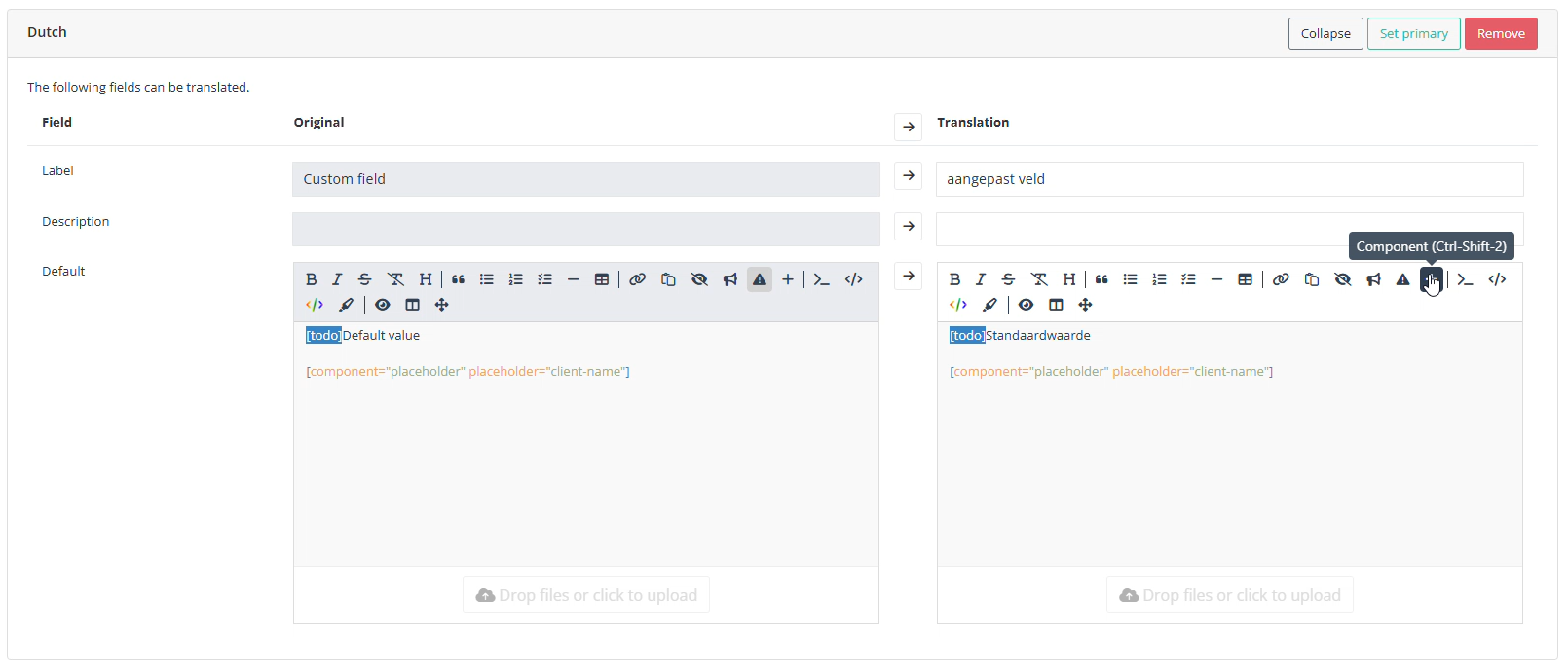
Defaults of text, textarea, Markdown, and file custom fields can now be translated per language in the custom field's translations. New findings receive the default in the assessment's language, falling back to the primary language when no translation exists.
Uploading a document via the API to a finding section that is not included in the finding's layout now returns a 422 validation error. Previously, the API returned 200 OK, even though the uploaded file was ignored.
Checklists in the API
Checklists and Checklist Templates can now be retrieved through the API. Clients can only read published checklists of their assessments. See the API documentation for the available routes and token permissions. Write functionality will be available in a future release.
Azure Blob Storage
Reports, documents, and backups can now be stored in Azure Blob Storage. Set the relevant *_STORAGE_DRIVER to azure and authenticate with an account key, a connection string, or Microsoft Entra ID, including managed identities. See Deployment > Configuration > Azure Blob Storage in the documentation for the full configuration.
The status report now tests whether each S3 and Azure storage disk can actually be written to, so storage misconfigurations surface immediately.
Improvements
- Added a Clear formatting button to the Markdown editor, which removes bold, italic, strikethrough, and inline code formatting from the selection. It is also available with Ctrl+\ (⌘+\ on macOS).
- Hovering an uploaded image thumbnail now shows a large preview, including for images that have been selected but not yet uploaded.
- The Schedule page now remembers your choice between week and month view and whether completed assessments are shown.
- Administrators can now allow sessions to continue when a user's IP address changes within a trusted network range, for example on networks with rotating egress addresses. Configure the ranges with
SESSION_IP_TRUSTED_RANGES; see Session IP binding in the configuration documentation. - An invalid authenticator app code now explains that codes depend on the time, and suggests checking the date, time, and time zone on the device running the authenticator app.
- OAuth connections now show a more specific error when the provider metadata URL cannot be reached or does not return valid metadata.
- Small changes in a version comparison are now shown as at least 1% instead of 0%.
- PDF reports with many or large code blocks now generate considerably faster and long lines in code blocks also wrap more accurately with non-Latin characters (such as Chinese characters and emojis).
Bug Fixes
- Fixed an issue where the "modified this" banner for sections shown as an assessment tab credited the reviewer with changes made by others. It now compares every version of the section.
- Fixed an issue where findings that were marked as Accepted Risk before the Remediation Status update could fail to open after a retest was deleted or cancelled.
- Fixed an issue where review and publish events on retests did not show the Show changes button, and retest approval notifications and emails did not say how much the retest had been modified.
- Fixed an issue where disabling Show as label on a custom field placeholder had no effect. Placeholders without this option enabled now display their value as plain text.
- Fixed an issue where Tenable imports failed for results with CVSS 3.1 vectors.
- Fixed an issue where MCP clients could not read Reporter's documentation. The MCP configuration example in the documentation has also been corrected.
- Fixed an issue where webhooks to hosts with only an IPv6 address could not be delivered.
- Fixed an issue where a multi-value filter closed after selecting its first value in Firefox.
- Fixed an issue where the notification for a password-protected draft management report linked to the full draft report.
- Fixed an issue where the Download with password dialog kept reopening when opened from a notification.
- Fixed an issue where the email address of a blocked user could be changed through the API.
- Fixed an issue where HTTP responses were not highlighted if they did not include a reason phrase.
- Fixed an issue where assessment tags were not visible in the list of assessments on a client's overview page.
- Fixed an issue in the Markdown editor where pasting an internal URL over selected text would prepend the URL instead of replacing the selected text.