MCP (Model Context Protocol) server
Reporter now ships with a built-in MCP server, allowing AI assistants to interact with your Reporter instance through natural conversation.
Short screen recording showing the MCP server in action:
Read the transcript
In this demo, an AI assistant first creates a new client and security assessment in Reporter using a single prompt. The client information is automatically fetched from the company website, and the assessment is scheduled as instructed. The assessment is now created, including the report structure and configured targets.
Because the assistant now has direct access to Reporter, it can also support researchers with the assessment itself. Here the AI reviews the web application's source code, identify security issues, and automatically creates potential findings in draft mode.
By viewing the report, we can see what the findings look like. In the results section, we can see the findings have been added to the appropriate sections of the report. They are grouped by category such as injection and ordered by their risk classification. Each finding includes severity, description, risk explanation, remediation advice, and supporting evidence such as affected code references and screenshots.
If an issue could be reproduced in the running application, the AI even captured a screenshot as proof using a real browser session. Everything is prepared for the researcher to review and verify. Using the MCP server, the AI assistant has access to more than 100 Reporter tools that support the full assessment lifecycle, bringing AI directly into the security assessment workflow.
When creating an API token, Reporter also provides the MCP configuration JSON. Copy this to your AI client to give it access to more than 100 Reporter tools covering the full assessment lifecycle.
Works with popular AI assistants such as Claude and ChatGPT, self-hosted AI tools, and developer environments like Cursor or Visual Studio Code to assist in code reviews or white-box assessments, as well as any other MCP-compatible client.
This is the first step in a broader set of AI capabilities planned for upcoming releases.
Visibility controls for checklists
You can now fine-tune how checklists are made visible to client users. The following visibility options were added:
- Private: Hidden from clients and visible only to researchers.
- Unpublished: Hidden from clients while the assessment is in progress and automatically published upon completion. Optionally, checklist progress can be shown to clients without revealing detailed results (e.g., pass/fail status).
Joined code blocks
Added support for joined code blocks in Markdown.
Two types of joined code blocks are supported:
Vertically joined code blocks allow snippets with different syntax highlighting styles to be combined. This is useful when a single example contains multiple languages.
Horizontally joined (side-by-side) code blocks improve readability for request/response examples and other related snippets.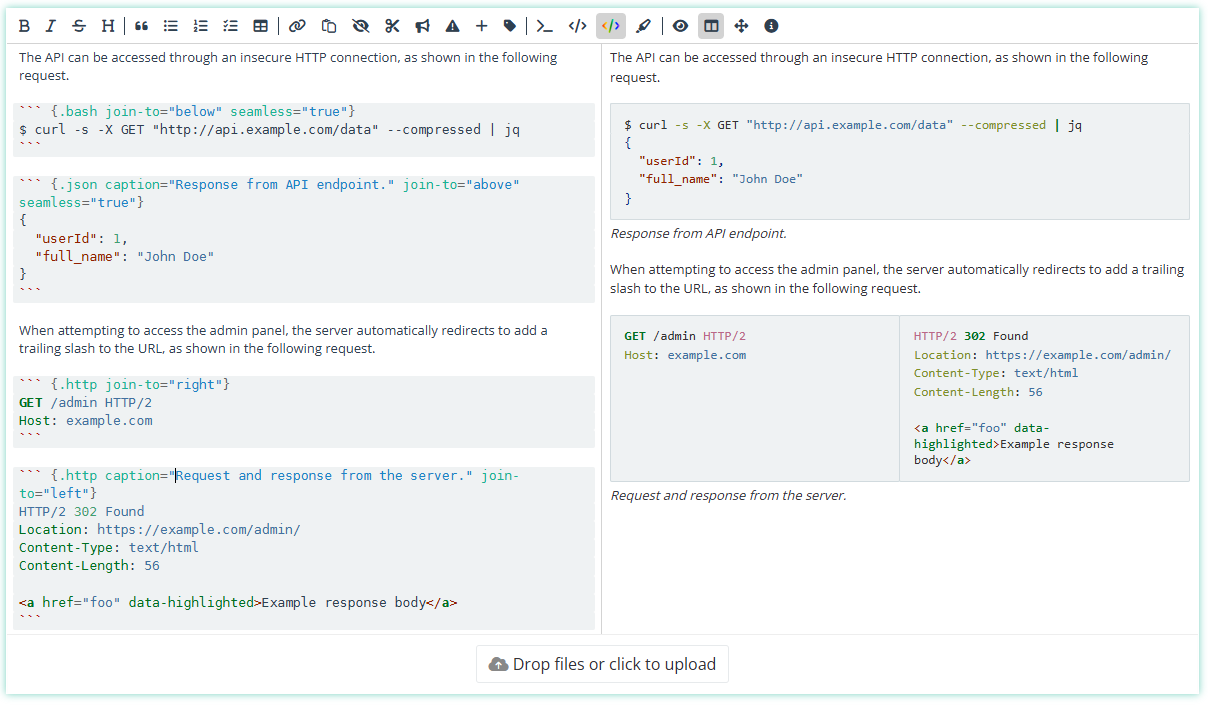
Improvements
- Added a new Compliant / Not Compliant scoring system.
- The 2025 version of the OWASP Top 10 is now available, both as an assessment template and a checklist template. On existing installations, admins or template managers can add these templates by going to the assessment template or checklist template page, and clicking the "Clone default template" button.
- Added an option to the Findings Table report component to display a column with the original severity of each finding.
- The Research Started On report component now allows selecting an end date different from the delivery date.
- Admins are now notified by email when a webhook fails. OAuth connection failures notify only the user who configured the connection.
- Checklists can now be reordered in assessments and assessment templates that contain multiple checklists.
- Admins can now cancel assessment deletion requests submitted by clients.
Bug fixes
- Image tags are now fully stripped when creating a template from a finding (including parameters such as
{scale=100}). - Fixed an issue where the Request revision button in the Summary tab of the assessment overview did not function correctly.
- Fixed a bug that caused an error to appear when deleting an assessment.
- Fixed a server error that occurred when resolving a finding without a severity.
- Fixed a 500 API error that occurred when updating custom fields without permission to update default fields.
- Restored missing tooltips for Markdown form element labels.
- Fixed an issue where certain characters caused section headers to terminate prematurely in PDF reports.
- Fixed an issue where some properties did not update when editing an assessment checklist.
- Fixed an error in the online report when a report page was missing a background.
- Fixed minor badge styling issues in reports.