Releases

2024.03.07

Download Show checksums

Upgrade Heads-up! Grab a coffee and sit back while you deploy this upgrade ☕ – this release will take a bit longer than usual due to database migrations. And as always, remember to create a backup before diving in.

Frequent assessment tabs

Your go-to assessments are now even more accessible! We've introduced a new feature that places your most frequently visited assessments at the top of the screen for quick navigation. For even faster access:

  • Pin your favorites: Simply hover over a tab to pin assessments you frequently use.
  • Discover more: Click the dropdown icon on any frequent assessment tab to view additional information and insights.

Display of findings with many targets

To enhance clarity and reduce clutter in areas of the application and reports that display finding targets, we've introduced a new approach:

  • Simplified Target Lists: In reports, tables, and the researcher panel, we now show a concise list of targets (e.g., "target1, target2, target3, and 17 more"), providing a cleaner view without compromising on detail for findings with numerous targets.
  • Detailed Reporting: Each report now efficiently lists up to 25 unresolved and 25 resolved targets, clearly indicating if more targets are not shown.
  • Improved Navigation: The main findings page features paginated targets, making it easier to navigate and review extensive lists.
  • Customization and Localization: Tailor the presentation to your needs by customizing and translating the "..., and x more" string for reports. This option is available under Settings > Languages, ensuring that the interface meets both your linguistic and functional preferences.

Other Improvements

  • We've restructured how comments and status updates (finding events) are displayed under findings in the portal, leading to enhanced performance and reliability. This update also resolves a previous issue where the API was not returning certain comments.
  • The review page now shows all finding events for reviewable findings instead of just some of them.
  • We've updated our markdown editor shortcuts to avoid conflicts with common operating system shortcuts and enhance consistency with other tools like GitHub and Slack. The shortcuts have been added to the documentation.
  • The markdown editor's ! character has been refined to make toggling the reference popover in the markdown editor smoother.

Bugfixes

  • Fixed a bug where the CVSS 4 calculator did not correctly calculate a score of 0.
  • Resolved a double HTML encoding issue affecting several values, particularly within task functionality.
  • Fixed the drag-drop behavior of text in the markdown editor. 
  • Fixed breaking side-by-side diff when long words were used.
  • Fixed an issue where full-width tables were always aligned left.
  • Fixed bug where date format was always added to component placeholders in the markdown editor.
  • Fixed several minor bugs related to the theme text items and multi-language feature.
  • Addressed inconsistent line wrapping in report PDFs.
  • Empty comments now trigger a clear validation error.
  • The correct radio button values are now set when editing an assessment role for the permission "edit internal details".
Read more

2024.02.12

Download Show checksums

Analytics Page

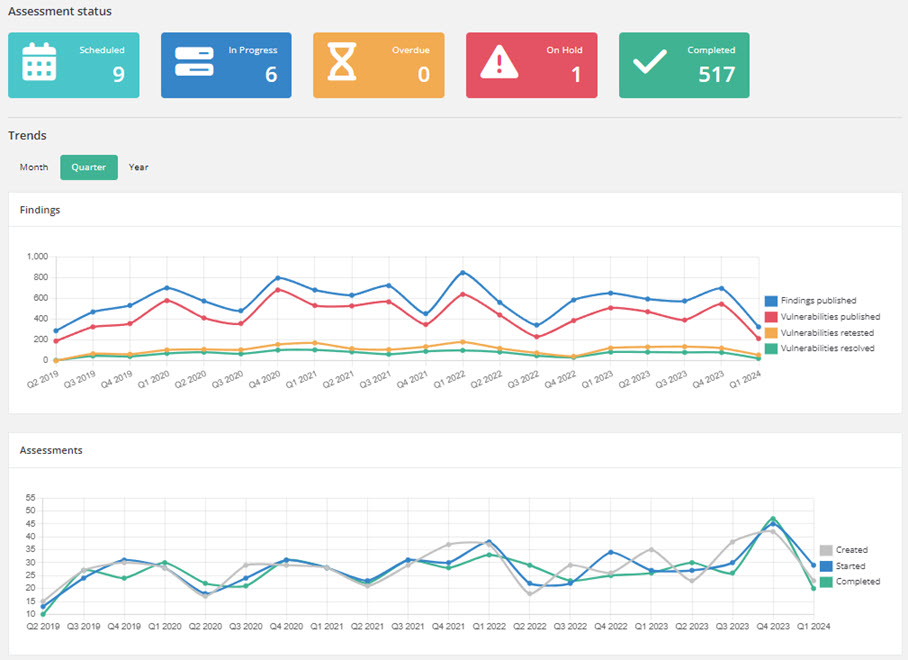
Dive into a comprehensive analytics page accessible from the main menu. Explore detailed insights, including findings, assessments, trend analyses, severity counts, remediation strategies, and the top 5 assigned classification categories for each classification system. Tailor the analytics to meet your needs with filters for each client.

Security Reporter analytics

The dashboard for client users has been refreshed, showcasing key analytics - findings categorized by severity and status, critical and high-risk remediation efforts, average resolution times, and the top 5 unresolved severe findings, including their age.

Action Plan 

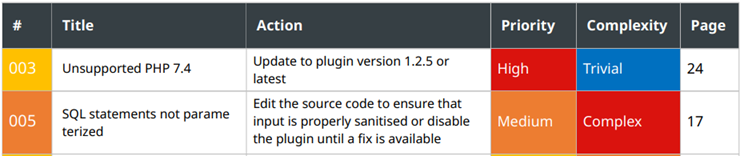
Activate the Action Plan for an assessment to define a clear path forward for resolving findings. Customize each action plan with:

  • Priority: Set the urgency levels.
  • Complexity: Estimate the effort required for resolution.
  • Action: Outline specific steps for mitigation.

With the Action Plan enabled, you can gain immediate access to a dedicated action tab from the assessment page and seamlessly integrate the action plan table into any report section. Simply select it from the component list in the markdown editor for seamless integration.

Security Reporter action plan

CVSS 4.0 Scoring System

Reporter now supports the latest Common Vulnerability Scoring System, Version 4.0 (CVSS 4), offering a more nuanced and precise approach to vulnerability scoring. This enhancement allows users to assess and prioritize vulnerabilities with greater accuracy. Alongside the integration of CVSS 4, we've implemented improvements across all scoring systems within Reporter.

Other Improvements

  • A new global "Project manager" role. This role is tailor-made for those who oversee project progress and quality without altering core system configurations. 
  • Users can now import findings from previous assessments with the status "draft" or "under review" instead of "published".
  • To ensure the integrity of published findings, importing findings as "published" now requires review permissions.
  • Improved text selection behavior in the markdown editor.
  • Add researchers and reviewers to the report separately.

Security

Webhook secrets have been removed from the edit page.

Bugfixes

  • Addressed an issue where users were unable to reset a finding's original severity and remove status change events if the current and original severities matched.
  • Corrected the sorting order for resolved targets in finding events to ensure accuracy when displaying the most recent events first. Furthermore, the loading performance has been improved.
  • Fixed a problem that prevented ordering first-level assessment sections within assessment templates.
  • Fixed notification label sizing.
  • Fix the 'enable password' checkbox on the setup page.
  • Fixed inconsistent indentation of lists in the PDF report.
  • Fixed a bug where tables that should appear indented in a list were not indented properly.
  • Finding retests now have a versions button.
  • Fixed an issue where date formats for placeholder components were not added to the shortcode.
Read more

2024.01.19

Download Show checksums

Improvements

  • Added the ability to rotate theme text boxes;
  • Improved the positioning of the comment reply based on the event ordering;
  • Clarified Cloudflare documentation;

Security

  • Updated a third-party library to address a known vulnerability. It's important to note that this vulnerability did not impact Reporter, as the affected functionality was not in use.

Bugfixes

  • Fixed a severe slowdown when listing findings after adding a new language;
  • Fixed a bug where the table of contents would have the wrong font in the theme preview;
  • Addressed several minor JavaScript issues associated with the new markdown editor.
  • Fixed an exception after attaching a snippet;
  • Resolved an issue where deleting an assessment comment would leave its child comments visible in the timeline until the page was refreshed.
Read more

2023.12.29

Download Show checksums

Report translations

Write your pentest reports in the language of your choice! The following key components have been made translatable to enhance your reporting experience:

  • Report Themes
  • Assessment templates
  • Snippets
  • Finding templates

Easily add new languages by importing ready-made translations from our public GitHub repository.

With this feature, you're not limited to adding new languages, but it also offers the flexibility to modify the default English terms. For instance, you can personalize your reports by renaming terms like "Proof" to "Evidence" to better align with your organization's terminology or reporting style.

New markdown editor

The markdown editor in Reporter has been completely rebuilt, offering a more robust and user-friendly experience. This upgrade paves the way for new functionalities, including the planned addition of annotation tools.

Key enhancements of the editor:

  • Improved Grammar Tool Support: Enjoy better integration with grammar assistance tools such as Grammarly for error-free writing.
  • Image Previews on Hover: Easily preview images by hovering over their markdown tags, adding convenience to your editing process.
  • Enhanced Syntax Highlighting: The editor now offers syntax highlighting for code blocks, making code more readable.
  • Streamlined Document Handling: Quickly find and track your uploaded documents within the markdown, and easily see which documents haven't been added yet.

Other improvements

  • In assessments and findings, comments can now be sorted to show the most recent either at the top or bottom of the list.
  • Okta SSO support.
  • New target types.
  • Cloudflare documentation.
  • Theme textboxes are now conveniently located under the theme settings tab, eliminating the need for page reloads for each textbox change.
  • Amazon S3 library updates for improved IMDSv2 support.
  • The default gray font color has been darkened, making text easier to read on the web portal.
  • The loading of assessments and findings with many targets has been optimized. We'll add more improvements in the upcoming releases.
  • Allow disabling the verification of SMTP TLS certificates.
  • The built-in Reporter theme has transitioned to Noto Sans font, enhancing multi-language support and resolving rendering issues in Adobe Acrobat Reader. You can easily configure the Noto Sans font for your own (custom) themes.

Bug fixes

  • Fixed broken PDF generation caused by using ^ in code tags.
  • Fixed task links on the dashboard not setting the correct status filter.
  • Addressed ID confirmation failures when SSO providers return emails in uppercase.
  • Fixed problems in assessments with large uploads (e.g., videos) that hindered ZIP download functionality.
Read more

2023.10.23

Download Show checksums

Improvements

  • Added the ability to migrate multiple assessments to a new theme.
  • Introduced a configuration option to sign AuthnRequest messages. For more details, please refer to the updated documentation.
  • Severity labels are now more consistent with other labels.

Bugfixes

  • Resolved an exception that occurred when attempting to create a finding template.
  • Addressed an issue where credentials for targets were not imported accurately from past assessments.
  • Long words should no longer overrun table cells and page margins in the PDF report.
  • Fixed an inconsistency concerning the default settings for Two-Factor Authentication.
Read more